Professional Photography Equipment List for Headshots
Most professional photography equipment lists start with a shopping cart. That's backwards. A polished LinkedIn portrait, casting image, or team page doesn't care how impressive your camera bag looks. It cares whether the final image has credible lighting, flattering perspective, consistent color, and a face that still looks like the person.
A full kit can solve those problems, but it can also create them. You'll manage lenses, batteries, memory cards, lighting ratios, color correction, storage, maintenance, and retakes before you deliver one usable headshot. For many professionals, the faster route is a controlled AI portrait workflow that starts with ordinary personal photos and fixes the production obstacles after upload.
Why the Right Equipment List Starts with the Outcome
Most gear guides oversell ownership and undersell the deliverable. They assume every reader needs a body, several lenses, a studio flash system, multiple modifiers, backup storage, and a redundant second camera. A working portrait photographer may need that infrastructure. Someone updating a LinkedIn profile usually doesn't.
Start with the image you need. A consultant might want a credible business portrait for LinkedIn, a warmer personal-brand version for a website, and a speaker image for an event page. An actor may need several looks for a casting portfolio. An HR team may need 40 matching employee portraits, with consistent backgrounds, clothing direction, and lighting across people who live in different cities.
Those outcomes create different equipment decisions.
A physical setup makes sense when you need a real location, a product in the frame, a documented event, or visual context that must exist in the world. It's less compelling when the result is a clean, controlled portrait with a neutral background and repeatable styling. In that situation, the cost per usable image matters more than the number of items in your kit.
A current portrait also has business value. LinkedIn-related reporting cites platform data that profiles with a photo receive 21 times more profile views and up to 36 times more messages than profiles without one. Those figures don't prove that photo quality alone causes every increase, but they do support a simple commercial conclusion: having a credible, current portrait is better than leaving a blank profile image while you plan an elaborate shoot.
Use this list as a decision tool:
- Define the final placements: LinkedIn, an author page, a company directory, a casting profile, a real-estate listing, or print.
- Identify the consistency requirement: One portrait gives you flexibility. A team gallery demands repeatable color, framing, and expression.
- Estimate the number of usable images: A single strong image has a different cost structure from a library of variations.
- Choose the shortest reliable workflow: Physical equipment, rental, studio photography, or AI generation can all be valid choices.
- Judge the result, not the kit: The customer sees the portrait, not your lens mount or light stand.
The rest of this guide follows that logic. Camera and lens choices address perspective and cropping. Lighting equipment addresses consistency. Accessories address failure prevention. The final decision is whether owning any of those tools gets you to the required portrait faster than renting or using an AI headshot workflow.
Verander je professionele imago
Ontvang verbluffende AI-gegenereerde professionele headshots in minder dan een uur. Upload gewone selfies of groepsfoto's, kies uit meer dan 100 stijlen en wij maken honderden perfecte foto's die jouw beste ik weergeven.
Camera Bodies and Lenses That Actually Matter for Portraits
A great portrait does not start with the most expensive body. It starts with the crop, perspective, and file flexibility the final use demands. For a physical portrait kit, I'd buy a full-frame interchangeable-lens mirrorless body in roughly the 24–45 MP range and stop there unless the assignment clearly asks for more. Resolution guidance for portrait work explains the core point well. More megapixels do not automatically produce more visible detail if the lens cannot deliver it.
That resolution range gives you room to crop one session into several deliverables without turning every shoot into a storage and editing burden. A strong original can become a LinkedIn square, a website banner, and a print-ready bio image with much less compromise. If your real output is one clean headshot for web use, chasing extra resolution is usually money spent on specifications instead of results.
Lens choice changes the portrait more than body choice does. For headshots, a 50–85 mm full-frame-equivalent lens is the range I'd recommend first. It gives you flattering perspective and enough working distance to direct the subject without standing in their face. Pair that with an aperture around f/1.8–f/2.8 when you want subject separation and cleaner backgrounds. Go wider only when the room forces it, because getting too close starts to distort facial features.
The practical lens pairing
Buy one zoom and one prime only if you will use both. A standard zoom is the practical assignment lens. It handles tight offices, quick reframing, and mixed deliverables where you need both a close headshot and a wider environmental portrait without changing lenses every few minutes. A fast prime is the specialist choice. Use it when you want stronger background blur, a lighter setup, or a more consistent portrait look.
Mirrorless is now the default body type, and that matters because the market has already shifted around it. market reporting on photography equipment shipments says global photography-equipment sales in 2023 exceeded 54.7 million units, with mirrorless cameras at more than 18.6 million units versus about 9.1 million DSLRs. The same reporting puts lens shipments at roughly 22.3 million units, including around 13.9 million zoom lenses and 8.4 million prime lenses. That lines up with what working portrait shooters need: a flexible zoom first, then a prime if the jobs justify it.
Do not buy lenses to satisfy a checklist. Buy them when you keep losing shots to cramped working distance, weak background control, or slow framing changes. If the client only needs polished business portraits from ordinary phone photos, owning a body and two lenses may be the slowest path. Renting can make more sense. In some cases, an AI headshot workflow is cheaper and faster than building a kit at all.
If your studio also offers cosmetic services such as microblading, keep that budget separate. Bonna Beauty tattooing equipment serves a completely different client outcome than portrait-capture gear.
For physical headshots, prioritize reliable autofocus, accurate eye detection, and handling you can trust for a full session. Then set the camera correctly. These camera settings for headshots help you get consistent files fast, but good settings still cannot rescue a bad lens choice or an unnecessary gear purchase.
Lighting Gear and Modifiers for Repeatable Portraits
Lighting is where an amateur headshot usually fails. The camera may be capable, but a small bare flash creates hard facial shadows, mixed color sources shift skin tones, and inconsistent exposure forces you to correct every frame separately.
A dependable portrait setup starts with one color-consistent flash or LED source, a large softbox or umbrella, a reflector, light stands, and a gray card or calibrated color target. Each item earns its place because it removes a specific variable.
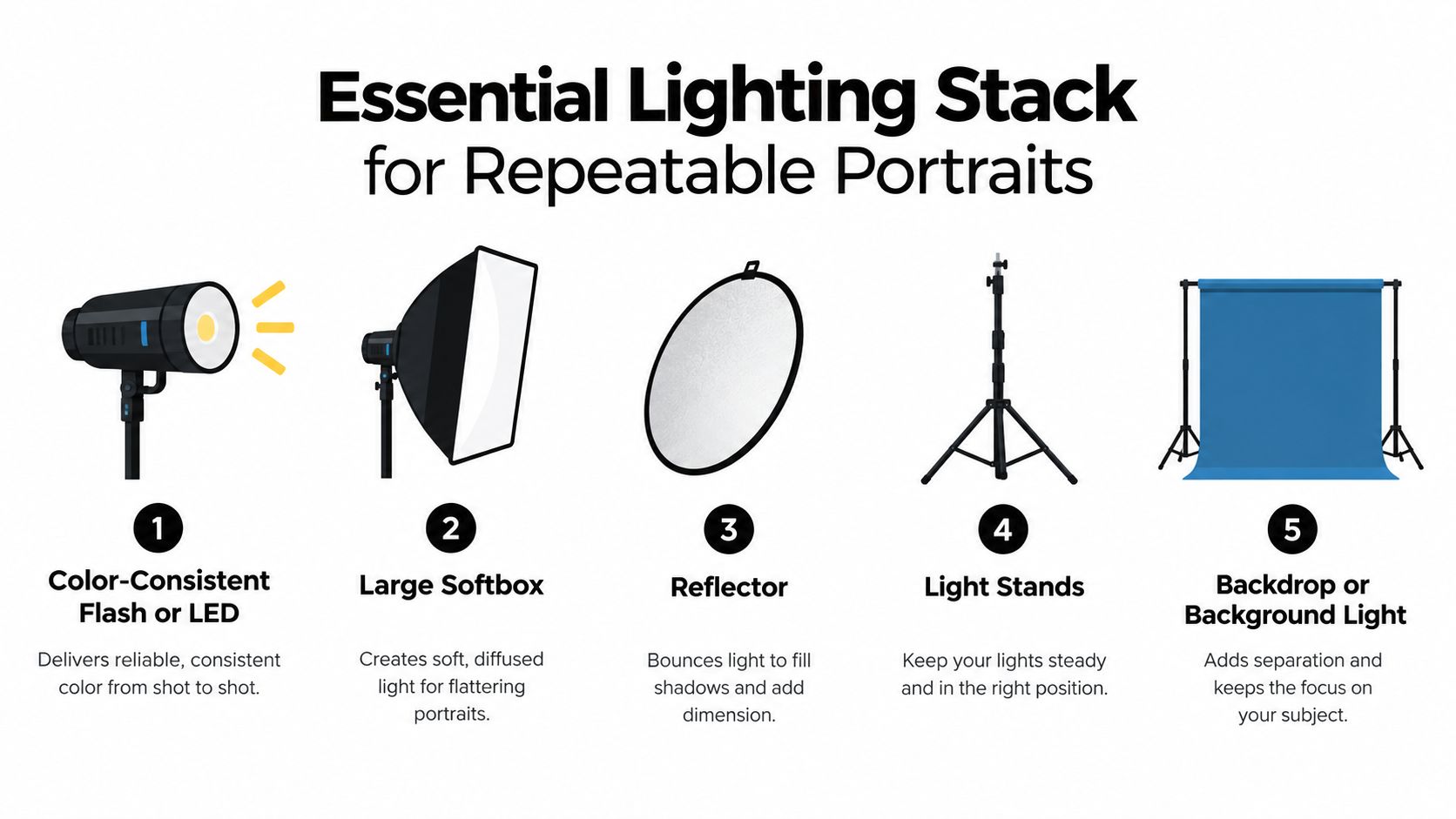
Build the one-light setup first
Place the large diffused source slightly above and to one side of the subject. The modifier spreads the light over a larger area, which creates softer transitions across facial shadows than a small bare flash. Put the reflector on the opposite side, close enough to lift contrast without flattening the face.
Run the light manually. Keep the power, color temperature, modifier position, camera position, and subject direction fixed. Take a reference frame with your gray card or color target. That simple discipline gives you a stable starting point for a team gallery, because the next person enters the same visual system rather than a new experiment.
A professional flash or LED specification may include CRI near 96 and TLCI around 95–97, values associated with strong color rendering in this lighting equipment guide. Better spectral consistency can reduce correction work across skin tones, clothing, and corporate brand colors. It won't compensate for bad placement, but it prevents the light itself from becoming an avoidable source of color drift.
- Light source: Use a flash or LED with stable output and predictable color.
- Modifier: Choose a large softbox or umbrella for flattering facial transitions.
- Reflector: Lift the shadow side without adding another powered light.
- Stands: Keep every position stable and repeatable.
- Color target: Establish a reference before photographing the full group.
- Background control: Separate the subject from the background with distance or a dedicated background light.
Consistency beats complexity
A battery-powered strobe with high-speed-sync capability helps when you work outdoors or in bright ambient conditions. It gives you more control over the balance between the subject and the environment, but it also adds charging, transport, and setup tasks.
The operational burden grows with every additional light. You need cases, stands, batteries, maintenance, insurance, and time to position everything. A controlled AI portrait workflow can start with ordinary personal photos and correct lighting, exposure, framing, and background problems after upload. That matters for a remote professional who can't arrange a studio, and for an HR team that needs matching portraits without moving every employee into one physical setup.
For appearance-led preparation before a portrait session, some clients also appreciate practical grooming references such as Skin Perfection's picks. It's a small detail, but clean preparation supports a more consistent source image. The larger lesson remains simple: use physical lighting when you need physical control, and skip the setup when the final portrait can be produced reliably without it. A repeatable professional lighting workflow helps photographers make that setup faster when a real shoot is the right choice.
Supports, Storage, and the Accessories Pros Never Skip
The camera and lens get attention because they're easy to admire. Paid work is protected by less glamorous equipment: stable supports, charged batteries, reliable cards, and more than one copy of the files.
Start with the minimum viable support kit. Use a tripod when framing must stay identical, especially for team portraits or repeated self-portraits. Use sturdy light stands that won't shift when someone walks past. Add sandbags if the setup is in a busy office or outdoor location.
Reliability is the priority
Your portrait-session checklist should include:
- Memory cards: Carry multiple cards and rotate them rather than trusting one card for the entire assignment.
- Power: Bring spare batteries, chargers, and a way to recharge between locations.
- Storage: Copy the files to a working drive and a separate backup before formatting any card.
- Color workflow: Use a calibrated display and consistent editing settings when skin tone and brand color matter.
- Transport: Protect bodies, lenses, and lights from impact, moisture, and unnecessary handling.
- Tethering: Use a cable and computer workflow when an art director or client needs to review framing immediately.
The zoom-plus-prime pairing is useful here because it reflects how professionals divide assignments. The zoom handles speed and changing compositions. The prime handles portraits where aperture, separation, and optical character matter. But each lens adds a storage slot, a cap to lose, a surface to clean, and another item to insure.
A professional kit is a system, not a camera. That's consistent with the shipment picture described earlier, where cameras and lenses move through the market as connected categories rather than as isolated purchases. The body only creates value when power, storage, lighting, and post-production keep the workflow moving.
The hidden cost of backup habits
Every physical file requires management. You'll need naming conventions, folder discipline, backup verification, card replacement, and a plan for retrieving an image months later. A missed backup can turn a paid session into a reshoot, and a dead battery can waste the short window when a subject is available.
An AI headshot workflow removes much of that equipment maintenance for customers. They still need good source photos and a sensible review process, but they don't need to own redundant bodies, maintain a lighting case, or preserve a catalog of physical accessories. For a one-off professional portrait, that difference can matter more than the marginal image-quality benefit of an expensive lens.
Buying, Renting, or Skipping the Kit Entirely
There are three sensible ways to produce a professional portrait. Own the equipment, rent it for a defined assignment, or skip the physical kit and use an AI headshot workflow. The right answer depends on repetition, control, and the value of getting a usable image quickly.
Ownership makes sense for a working photographer with regular paid assignments. The equipment earns its keep through frequent use, and the photographer benefits from knowing every control, modifier, and backup routine. It makes little sense for someone who updates a LinkedIn portrait occasionally and would otherwise store a camera between sessions.
Rental is the middle route. Market reporting indicates that rental can remove maintenance, insurance, storage, and repair expenses, potentially reducing total ownership costs by 60–80% compared with purchasing outright. The same rental-market analysis places professional mirrorless rental rates at roughly 35 per day for entry-level bodies and 120 per day for flagship models. Renting also keeps equipment in circulation through repeated use, refurbishment, repair, and redistribution.
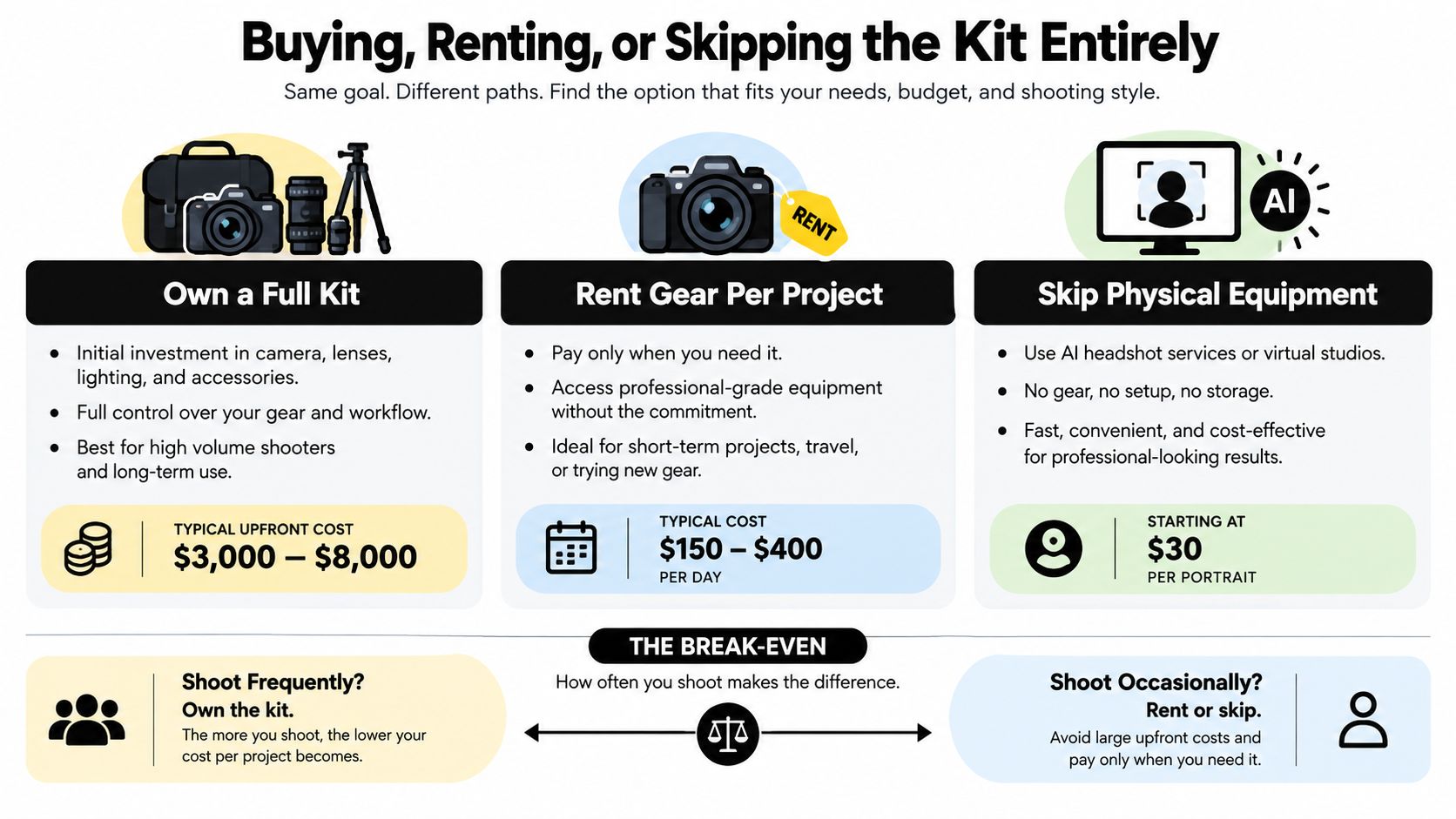
Match the path to the assignment
A quarterly team refresh may justify a coordinated physical shoot if the company needs one location, one photographer, and real wardrobe direction. A distributed team may reach the same business outcome faster with a controlled portrait workflow that applies consistent styles to individual uploads.
An actor's portfolio may require physical photography when the images must document a real performance identity, body, costume, or location. A consultant changing industries may only need several credible portrait versions, such as formal corporate, warm personal-brand, and speaker-profile styles. Buying a kit for that single need is difficult to defend.
Physical photography still wins for products, locations, events, and images requiring verifiable real-world context. It also wins when a client needs a photographer's direction, real wardrobe styling, or a particular set. For a clean professional headshot, however, skipping the kit can eliminate setup, travel, rescheduling, and correction work.
Troubleshooting the Problems Gear Creates
The most common team-headshot failure is inconsistent appearance between frames. One employee looks warm, another looks green, and a third has a darker background because the light moved or the camera settings changed.
Fix the cause instead of repairing every file:
- Color shifts: Mixed light sources or unstable output create different skin and clothing colors. Use manual power, fixed color temperature, identical modifier placement, and a reference frame.
- Harsh shadows: A small bare flash produces abrupt facial transitions. Move to a large diffused source and use a reflector on the shadow side.
- Exposure errors: The camera may expose differently as clothing, skin tone, or background changes. Lock exposure manually and monitor the histogram.
- Framing drift: A tripod that moves, a subject who stands at a different distance, or a changing focal length breaks the gallery. Mark the subject position and camera height.
- Background inconsistency: Ambient light changes the background even when the face looks acceptable. Control the background separately or replace it during post-production.
NIST reports that false-negative rates depend strongly on image quality, with inadequate lighting or underexposure of dark-skinned people, overexposure of fair-skinned people, and incorrect camera pitch angles identified as conditions that can increase errors in its face-recognition image-quality guidance. For portrait workflows, that reinforces the practical need to evaluate lighting and angle across different people rather than assuming one preset works equally well for everyone.
Reduce the number of failure points
A physical session forces you to solve lighting, distance, camera height, expression, background, and exposure before the shutter is pressed. That control is valuable, but it's also why a simple headshot can become a technical production.
An AI workflow moves some corrections after upload. A professional working remotely can submit varied phone photos, choose a business style, and adjust the background or lighting without rebuilding a studio. The system still needs suitable source images and careful quality review, but the customer avoids many setup errors that occur before a traditional portrait is even captured.
The best workflow is the one that makes consistency repeatable. If that requires a locked physical setup, use one. If the customer's priority is a credible portrait quickly, reducing the number of physical variables usually gets there with less effort.
When AI Headshots Beat the Whole Equipment List
A polished professional portrait doesn't always require a camera body, portrait lens, softbox, reflector, and backup drive. If the desired result is a credible headshot for LinkedIn, a company biography, an actor profile, or a personal brand, an AI portrait studio can be the faster production route.
A typical workflow starts with 15 personal photos and produces 100–200+ HD images in under two hours, with Secta Labs' AI approach to professional headshots supporting more than 150 styles across business, LinkedIn, corporate, actor, and real-estate use cases. The customer can generate formal and relaxed variations, then edit clothing, expressions, backgrounds, hair, lighting, and retouching without arranging another shoot.
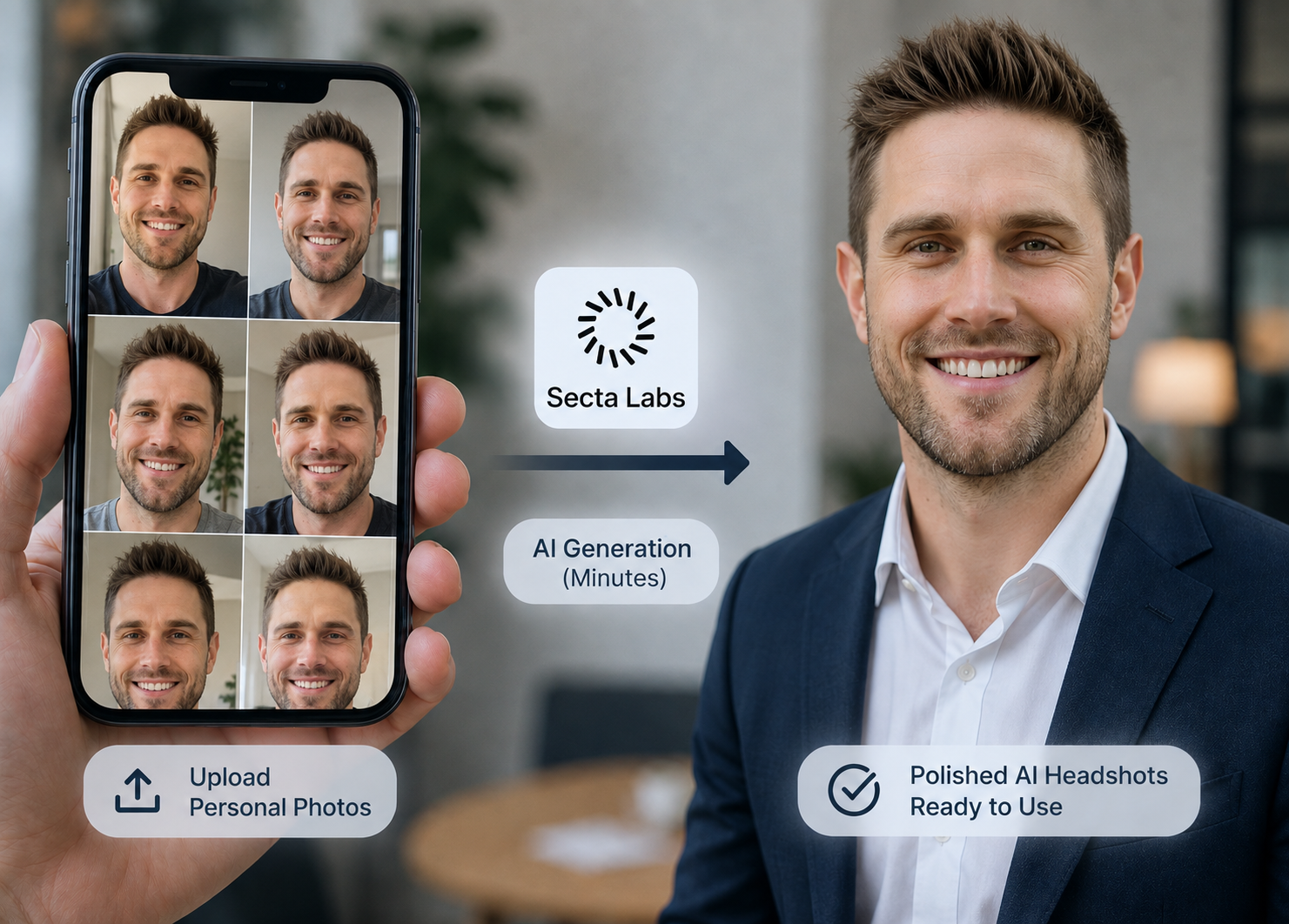
A consultant changing industries might create a formal corporate portrait for LinkedIn, a warmer image for a personal website, and a speaker version for event promotion in one session. An HR team can ask employees to upload personal photos from different locations, then review a consistent set of business portraits instead of coordinating one physical shoot across the entire company.
Quality review still matters. NIST evaluated nearly 200 face-recognition algorithms from nearly 100 developers, using more than 18 million images representing over 8 million people, and found that accuracy depends on demographic characteristics and image-specific quality factors, according to NIST's Face Recognition Vendor Test information. That finding supports evaluating identity fidelity, lighting, age, ethnicity, expression, and style across the output set rather than accepting the first attractive image.
Choose physical photography when the portrait must include a real product, location, wardrobe, performance, or documented context. Choose AI headshots when you need polished, varied, professional portraits without a studio schedule, travel, equipment ownership, or repeated retakes. The equipment list remains useful for photographers who produce portraits every week. For everyone else, the smarter purchase is the final image, delivered with fewer technical obstacles.
Upload your personal photos to Secta Labs and create professional headshots for LinkedIn, company profiles, casting portfolios, real-estate pages, and personal-brand campaigns without buying a full camera kit. Choose your styles, review the results, edit the strongest portraits, and select the images that make you look ready for the opportunities you want.