8 Professional Photo Pose Ideas to Master Your AI Headshots in 2026
In a world of instant digital impressions, your professional headshot often serves as your first handshake. A strong, confident AI-generated photo can unlock career opportunities, build trust with clients, and establish your personal brand. Conversely, a subpar image can inadvertently project the wrong message, potentially closing doors before you have a chance to make your case. The challenge has always been capturing that perfect shot, a process that traditionally involved costly photographers, inconvenient scheduling, and the pressure of a live photoshoot.
That entire paradigm has shifted. Generative AI now empowers you to create dozens of flawless, photorealistic headshots from your own photos, without ever stepping in front of a camera. This guide moves beyond generic advice and dives deep into the eight most impactful professional photo pose archetypes, providing a blueprint for generating powerful images for any scenario, from LinkedIn to a corporate directory. We'll break down the precise elements of each pose, from posture and expression to hand placement, so you can generate images that look authentic and feel powerful—all faster and easier with our solution. While many factors contribute to a great headshot, mastering your pose is the foundation. For those looking to refine their appearance even further, understanding how subtle enhancements from non-invasive cosmetic procedures can complement your natural features might be the next step.
This isn't just theory; it's a practical playbook. You will learn how to translate these time-tested posing techniques into specific selections within an AI headshot generator like Secta. For example, instead of trying to hold a pose, you simply select a "Direct Gaze" style from a library. The result? A comprehensive gallery of high-impact professional photos, tailored to your exact needs, all generated in a fraction of the time and cost of a traditional photoshoot.

1. The Direct Gaze Confidence Pose
The Direct Gaze Confidence Pose is the cornerstone of professional portraiture. This foundational pose involves looking directly into the camera, creating an immediate, personal connection with the viewer. It communicates confidence, trustworthiness, and approachability in a single glance, making it the undisputed standard for platforms like LinkedIn and corporate websites.
This isn't just a simple stare; it’s a strategic choice. In a digital world where first impressions are formed in seconds, direct eye contact builds instant rapport. For anyone looking to establish credibility, from a CEO of a Fortune 500 company to a consultant building a personal brand, this professional photo pose is non-negotiable. It signals that you are open, honest, and ready for business.

Transform Your Professional Image
Get stunning AI-generated professional headshots in under an hour. Upload regular selfies or group photos, choose from over 100 styles and we'll create hundreds of perfect shots that represent your best self.
When to Use This Pose
- LinkedIn Profiles: To establish a strong, professional first impression.
- Corporate "About Us" Pages: For creating a cohesive, trustworthy team gallery.
- Business Proposals & Email Signatures: To add a personal, credible touch to communications.
- Speaker Bios & Conference Materials: To project authority and confidence.
How to Achieve It with AI
Achieving the perfect direct gaze is simpler than ever with generative AI. Instead of trying to nail a natural expression in a studio, you can generate dozens of options in minutes. With our solution, you just upload your selfies and let the AI do the work.
- Angle and Posture: Select AI styles described as "headshot" or "corporate portrait." The AI is trained to generate headshots with your shoulders angled slightly away from the camera while your head turns to face it directly. This classic technique adds dimension and prevents the "mugshot" look. Our AI automatically ensures an "eye-level camera angle" for a powerful, direct connection.
- Expression: The key is a genuine, slight smile. Use AI to generate variations, from a neutral, confident expression to a warm, welcoming smile. For example, select a "Confident Smile" style in our generator. This allows you to A/B test which expression resonates best with your audience without any effort.
- Hand Placement: For this pose, hands are typically out of the frame. Our AI models for this pose keep the focus entirely on your face and expression.
- Clothing and Background: Select a professional clothing option like "Dark Suit" and choose a "Blurred Office" background. AI makes it easy to experiment with different backdrops without needing a physical studio, getting you the perfect shot instantly.
With AI, you can bypass the awkwardness of a traditional photoshoot and generate a flawless headshot that captures this essential professional photo pose. To dive deeper into the nuances of posing, explore our comprehensive guide on how to pose for a professional headshot.
2. The Shoulder Angle & Head Tilt Pose
Moving beyond the direct head-on look, the Shoulder Angle & Head Tilt Pose introduces dynamic lines and a touch of personality. This professional photo pose involves angling your shoulders away from the camera (typically around 45 degrees) while turning your head back to face the lens, often with a subtle tilt. This technique creates visual interest, adds dimension, and is universally flattering as it helps define the jawline.

This pose strikes a perfect balance between professional polish and personal warmth. The angled body language is less confrontational than a square-on shot, signaling openness and approachability without sacrificing authority. For professionals in client-facing roles like real estate or consulting, this subtle shift in posture can make all the difference in appearing friendly and trustworthy from the very first glance.
When to Use This Pose
- Modern LinkedIn Profiles: For entrepreneurs and consultants who want to appear both professional and approachable.
- Real Estate Agent Headshots: To build trust and convey a warm, client-focused personality.
- Personal Branding Websites: Perfect for coaches, creatives, and speakers looking to connect with their audience.
- Team Photos: Adds variety and a dynamic, modern feel to a corporate "About Us" page.
How to Achieve It with AI
Generative AI excels at creating this nuanced pose, allowing you to bypass the often awkward process of finding the right angle in a studio. You can generate multiple variations to see what works best for your facial structure and brand image instantly.
- Angle and Posture: To get this look, select AI styles described as "Friendly Professional" or "Dynamic Headshot." The AI is trained to generate images with a "45-degree shoulder angle" and "head turned toward camera." You can experiment by generating from different styles to find your most flattering side. Our AI makes it easy to ensure the back shoulder appears relaxed and doesn't create unflattering bulk.
- Expression: The head tilt complements a warm, confident smile. Our AI can generate versions with a slight, knowing smirk or a broad, welcoming grin, allowing you to see which best matches your industry's expectations for warmth.
- Hand Placement: Hands are generally kept out of the frame to maintain focus on the face and posture. Our AI headshot styles automatically handle this for you.
- Clothing and Background: This pose works well with both formal and business-casual attire. Our AI allows you to instantly test your generated pose against different backgrounds, such as a professional office setting or a simple, modern backdrop, to see what best supports your brand identity. For example, try the "Modern Office" background for a clean, professional feel.
3. The Three-Quarter Power Pose
Where the direct gaze builds connection, the Three-Quarter Power Pose builds authority. This commanding professional photo pose positions the body at a slight angle to the camera while the head turns back, creating a look of decisive leadership and strategic vision. It’s a subtle shift that adds depth and dimension, projecting confidence, control, and executive presence.
This pose is a favorite among leaders, entrepreneurs, and decision-makers for a reason. By turning the body slightly away, you create a more dynamic and less confrontational profile, yet the direct eye contact maintains engagement. This combination signals that you are an approachable authority figure, a leader who is both in command and ready to connect. For anyone in a role that requires conveying gravitas, from a law firm partner to a venture capitalist, this is an essential pose.

When to Use This Pose
- Executive & C-Suite Profiles: To project authority and leadership on corporate websites.
- LinkedIn Banners & Summaries: Perfect for sections emphasizing leadership experience or strategic roles.
- Consulting & Legal Firm Photos: To convey expertise, confidence, and a commanding presence.
- Real Estate Broker Profiles: To establish credibility and position yourself as a team leader.
How to Achieve It with AI
Crafting a pose that conveys power without appearing arrogant can be challenging. With generative AI, you can precisely control every element to create the perfect impression of authority in minutes.
- Angle and Posture: Select an "Executive Portrait" or "Leadership Headshot" style in your AI generator. These styles are trained to render a "three-quarter portrait" with "shoulders angled 45 degrees away from the camera" and "head turned towards the camera." You can generate variations with the chin angled slightly down to find the most commanding yet approachable look.
- Expression: A confident, subtle expression is key. Avoid overly broad smiles. Our AI can generate a slight, closed-mouth smile or a neutral, determined look. This projects seriousness and focus instantly.
- Hand Placement: This pose is ideal for including hands. Select an AI style like "Crossed Arms Portrait" or "CEO Desk Photo." The AI will generate options with "arms lightly crossed," "one hand in a pocket," or "hands resting on a desk," adding natural confidence to the image.
- Clothing and Background: Use our AI to experiment with power-centric attire like a sharp blazer or executive wear by selecting the "Blazer" or "Suit" clothing option. A dark, minimalist, or out-of-focus office background from our style library complements the pose, reinforcing a professional, high-stakes environment.
By leveraging AI, you can skip the time-consuming process of a physical photoshoot and instantly generate a portfolio of authoritative headshots. To see more examples of how angles can transform your image, check out our guide to professional photo poses.
4. The Approachable Candid Smile Pose
The Approachable Candid Smile Pose moves beyond stoic professionalism to build instant warmth and human connection. This professional photo pose features a genuine, open smile that reaches the eyes (a "Duchenne smile"), paired with a slight head tilt and relaxed shoulders. It’s designed to make you look friendly, trustworthy, and easy to work with, making it a powerful asset in any service-oriented or client-facing industry.
In a competitive market, being approachable is a strategic advantage. This pose signals empathy and a collaborative spirit, breaking down barriers before a conversation even begins. For professionals in healthcare, education, real estate, or coaching, this friendly yet polished image isn't just nice to have; it’s a crucial tool for building rapport and attracting the right clients or patients.
When to Use This Pose
- Healthcare & Wellness Profiles: To create a caring, reassuring impression for patients.
- Real Estate Agent & Sales Headshots: To build immediate trust and appear friendly.
- Coaching & Consulting Brands: For a warm, encouraging personal brand photo.
- HR & Recruitment Specialist Profiles: To seem open and approachable to candidates.
- Education & Faculty Pages: To appear supportive and accessible to students.
How to Achieve It with AI
Generating a truly authentic smile on command is difficult, but AI makes it effortless. You can produce countless variations of this professional photo pose, ensuring the final result looks natural and genuine, not forced.
- Angle and Posture: To achieve this look easily, select an AI style like "Friendly Coach" or "Welcoming Professional." These styles automatically generate a "slightly tilted head" and "relaxed, slightly angled shoulders," creating a composition that feels less formal and more conversational.
- Expression: This is where AI excels. Our solution can generate a "Duchenne smile" or "warm, genuine smile" automatically. You can create variations in intensity, from a subtle, gentle smile to a broader, welcoming grin, by generating from different "smile" styles. This allows you to select the perfect level of warmth for your specific industry and role in seconds.
- Hand Placement: Hands are typically kept out of the frame to maintain focus on your welcoming facial expression. Our AI handles this automatically for these types of headshots.
- Clothing and Background: Choose softer, warmer colors in your attire. Our AI can generate backgrounds that complement this warmth, such as a "Softly Lit Office" or a "Neutral, Warm-Toned Backdrop." For example, select the "Cream Sweater" clothing option for an instantly approachable look.
AI allows you to perfect this nuanced expression without the pressure of a live photoshoot. Explore more ways to refine your professional image by reading our complete guide on how to pose for a professional headshot.
5. The Over-the-Shoulder Pose
The Over-the-Shoulder Pose is a dynamic and engaging choice that breaks from traditional, static headshots. This professional photo pose involves the subject facing mostly away from the camera and looking back over their shoulder, often with a slight, confident smile. It creates an immediate sense of depth, implied movement, and visual interest while maintaining complete professionalism.
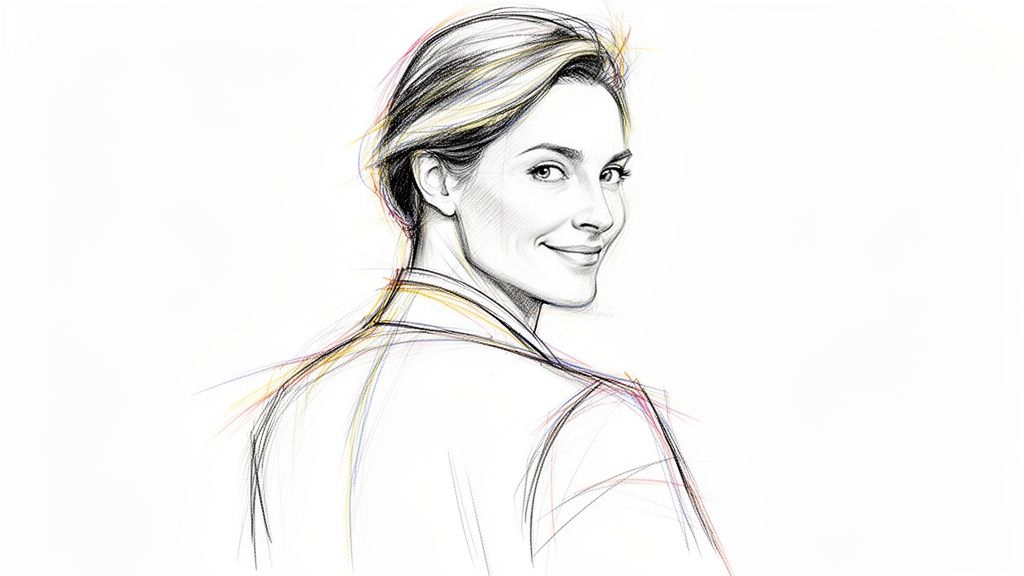
Strategically, this pose is a powerful narrative tool. It suggests a forward-thinking, ambitious individual who is pausing to connect with the viewer before moving ahead. For creative professionals, actors, or personal brands, it communicates approachability, energy, and a hint of intrigue, making it far more memorable than a standard forward-facing portrait. It’s the perfect way to convey that you are both focused on the future and open to connection.
When to Use This Pose
- Actor & Performer Headshots: To showcase versatility and create a compelling, character-driven look.
- Creative Professional Portfolios: Ideal for designers, artists, and photographers to reflect their innovative spirit.
- Personal Brand Websites & Social Media: To build a dynamic, engaging online presence that stands out.
- Real Estate Agent Marketing: To project energy, drive, and the ambition clients look for in an agent.
How to Achieve It with AI
Generating this sophisticated professional photo pose is effortless with AI, allowing you to create compelling and flattering images without a complex photoshoot. Our solution gives you precise control over every element to ensure the final result is perfect.
- Angle and Posture: The key is the angle of the turn. Simply select an "Over-the-Shoulder" or "Dynamic Portrait" style from our AI library. You can generate variations where your body is turned at different angles to see which best flatters your shoulder line and neck. The AI ensures the head turn feels natural, not strained.
- Expression: This pose pairs well with a subtle, knowing smile or a confident, neutral expression. Our AI can generate dozens of micro-expressions, so you can choose one that conveys warmth and ambition simultaneously just by re-running the generation.
- Hand Placement: Hands are typically not visible in this pose, keeping the focus entirely on the turn of your body and your direct eye contact with the viewer. The AI handles this for you.
- Clothing and Background: Professional yet creative attire works best. Consider generating images with a structured blazer or a top with an interesting neckline. With our AI, you can instantly pair this pose with dynamic background options from our style library, testing "Urban Rooftop" or "Abstract Studio" settings to see what best fits your brand.
6. The Seated Professional Pose
The Seated Professional Pose offers a compelling blend of authority and approachability. This professional photo pose involves the subject being seated, often at a desk or in a chair, projecting a sense of calm control and thoughtful leadership. It moves beyond the standard headshot, providing more context and creating a narrative of expertise and stability.
This pose is strategic for professionals who want to appear grounded, accessible, and in their element. For executives, consultants, and thought leaders, being seated communicates that they are both in charge and open to engagement. It’s a powerful alternative to standing poses, conveying a relaxed yet professional demeanor that builds trust with viewers.

When to Use This Pose
- Executive & Consultant Profiles: To project calm authority and established expertise.
- Author & Academic Headshots: To create a scholarly and approachable image.
- Therapist & Counselor Profiles: To foster a sense of safety, trust, and readiness to listen.
- Corporate Team Galleries: To showcase leadership in their natural work environment, adding authenticity.
How to Achieve It with AI
Generating a polished seated portrait is exceptionally efficient with AI, eliminating the need to stage a physical office. You can create a variety of sophisticated scenes and postures in minutes with our solution.
- Angle and Posture: Simply select a style like "Seated at Desk" or "Office Chair Portrait." The AI generates images with a slightly elevated camera angle and a straight back with relaxed shoulders, maintaining authority while looking natural. The AI also creates variations like leaning slightly forward for engagement or leaning back for a more relaxed feel.
- Expression: Because the body is more relaxed, a wider range of expressions feels authentic. Our AI can generate options from a pensive, thoughtful look to a warm, inviting smile, allowing you to tailor the image to the specific message you want to send.
- Hand Placement: The seated pose brings hands into focus. Generate variations by selecting different styles: some will render hands clasped on the desk, resting on an armrest, or held thoughtfully in the lap. Each placement subtly changes the tone from decisive to contemplative.
- Clothing and Background: Use our AI to add a blazer or professional jacket to enhance authority. Secta's background options are perfect here; generate images in a "Professional Office," "Modern Home Office," or "Minimalist Studio" setting to create the ideal context for your role instantly.
AI makes it simple to generate numerous team member images in this style for a cohesive company gallery. For more ideas on how to craft compelling leadership images, explore our guide to [poses for corporate headshots](https://secta.ai/blog/p/poses for-corporate-headshots).
7. The Confident Hands-in-Pockets Pose
The Confident Hands-in-Pockets Pose is the modern professional’s answer to balancing authority with accessibility. This professional photo pose involves standing with one or both hands casually placed in pockets, creating an image of relaxed confidence. It moves away from traditional, rigid corporate stances and signals a contemporary, human-centric approach to business.
This pose is more than just a stylistic choice; it communicates that you are comfortable, in control, and approachable. In industries like tech, creative fields, and modern consulting, where collaboration and personality are key, this pose strikes the perfect chord. It tells clients and colleagues that you are confident in your abilities without being overly formal or unapproachable, making it ideal for today's dynamic professional landscape.

When to Use This Pose
- Tech & Startup "About Us" Pages: To project an innovative, forward-thinking, and accessible team culture.
- Consultant & Coach Branding: For building a personal brand that feels both professional and relatable.
- Creative Industry Portfolios: To showcase personality and confident ease alongside professional skills.
- Modern Corporate Websites: For leadership profiles that aim to appear more human and less hierarchical.
How to Achieve It with AI
Generating this modern professional photo pose with AI is effortless, allowing you to create an image that feels natural and authentic. You can easily produce variations to find the perfect balance of casual and professional.
- Angle and Posture: Select AI styles described as "Modern Professional" or "Casual Corporate" to generate three-quarter or full-body shots that showcase this pose. Our AI is trained to create a straight-on camera angle with relaxed shoulders and a slight, natural lean, preventing the stance from appearing stiff.
- Expression: A confident, subtle smile or a thoughtful, neutral expression works best. Our AI tools generate options, from a warm, engaging grin to a more focused, serious look, depending on your brand's specific tone.
- Hand Placement: The key detail is the hand placement. Generate variations by selecting styles that feature "one hand in pocket" versus "both hands in pockets." Our AI ensures the thumbs rest naturally outside the pocket, a small detail that adds polish to the pose.
- Clothing and Background: This pose pairs perfectly with modern business casual attire. Use our AI's clothing options to experiment with clean lines, contemporary blazers, or even high-quality knitwear. Select "Modern Office" backdrops or "Clean Studio" backgrounds from the AI's style library to complete the contemporary feel in seconds.
8. The Tilted Head & Shoulder Drop Pose
The Tilted Head & Shoulder Drop Pose is a modern approach to professional portraiture that masterfully blends warmth with confidence. By combining a slight head tilt with one slightly dropped shoulder, this pose creates a relaxed, asymmetrical composition that feels both dynamic and genuine. It breaks the rigidity of traditional corporate headshots, signaling approachability, empathy, and trustworthiness.

This professional photo pose is highly effective for building perceived connection and relatability. In fields like real estate, coaching, or sales, where human connection drives business, this pose softens your image without sacrificing authority. It tells viewers you are confident yet open and easy to talk to, making it an invaluable asset for anyone building a personal brand or fostering client relationships.
When to Use This Pose
- Real Estate Agent & Broker Headshots: To appear friendly and trustworthy to potential clients.
- Personal Branding & Coach Profiles: For conveying empathy and an open, supportive demeanor.
- HR & Recruitment Professional Photos: To seem more approachable to candidates.
- Sales & Business Development Team Galleries: To present a team that is confident and personable.
- Modern LinkedIn Profiles: For standing out with a warm yet professional image across any industry.
How to Achieve It with AI
Creating this nuanced and approachable look is effortless with generative AI, allowing you to perfect the angle and expression with a single click. Our AI tools can generate dozens of variations, ensuring you find the exact composition that fits your professional brand.
- Angle and Posture: The key is asymmetry. Simply select an AI style from our library labeled "Friendly Headshot" or "Approachable Portrait." The AI automatically generates a portrait with a "slight head tilt" and "one shoulder slightly lower than the other." You can generate variations to find the perfect degree of tilt. This is particularly effective when using AI styles designed for real estate agents.
- Expression: This pose pairs perfectly with a genuine, warm smile. Use our AI to generate a range of expressions from a soft, closed-mouth smile to a more open, welcoming grin. This allows you to select the version that best communicates your personal brand of warmth without any extra effort.
- Hand Placement: Hands are typically kept out of the frame to maintain focus on the facial expression and relaxed posture. Our AI automatically takes care of this detail for you.
- Clothing and Background: Complement the pose’s warmth with approachable styling and colors. Generate options with soft, professional attire against clean, inviting backgrounds. Our AI makes it easy to create a consistent series of photos where only the clothing or background changes, perfect for building a portfolio in minutes.
With AI, you can generate a flawless headshot that captures this essential professional photo pose in minutes. To learn more about creating a compelling professional image, check out our guide on [how to pose for a professional headshot](https://secta.ai/blog/p/how-to-pose for-a-professional-headshot).
8-Point Comparison of Professional Photo Poses
Your Perfect Professional Headshot Is Just a Few Clicks Away
You’ve explored the subtle yet powerful nuances that separate a good headshot from a truly exceptional one. From the direct authority of the Direct Gaze Confidence Pose to the approachable warmth of the Candid Smile, each professional photo pose serves a specific purpose, communicating volumes about your brand before you ever say a word. We've broken down hand placements, shoulder angles, and expressions, not just as abstract concepts, but as strategic tools you can generate instantly.
The traditional path to achieving these looks was often paved with expensive photographers, awkward studio sessions, and a limited selection of final images. That era is over. The real takeaway from this guide isn't just what poses work, but how you can now achieve them with unprecedented ease, speed, and precision using AI.
The AI Advantage: From Theory to Reality in Minutes
The true revolution in professional branding is the ability to bypass the photoshoot entirely. With a generative AI solution like Secta, you are no longer a passive participant hoping for a good shot. You are the art director. You have the power to instantly apply the principles we've discussed:
- Experiment Without Risk: Want to see how the Three-Quarter Power Pose looks with a business suit versus a smart-casual sweater? Generate both versions in seconds. Curious if the Tilted Head & Shoulder Drop feels more authentic for your creative profile? You can produce dozens of variations to find the perfect fit.
- Achieve Perfect Consistency: For teams, ensuring every member has a high-quality, on-brand headshot used to be a logistical nightmare. Now, you can apply a consistent style, background, and professional photo pose across your entire organization with just a few clicks, creating a unified and polished brand presence.
- Control Every Detail: The most minute adjustments can make all the difference. With advanced tools, you can refine your generated images with incredible specificity. For those utilizing AI to generate headshots, mastering AI pose control can ensure your digital presence is as impactful as a real photoshoot, allowing you to fine-tune posture and angles digitally.
Your Next Steps to a Flawless Professional Image
An outdated or amateur headshot is more than just a bad picture; it's a missed opportunity. It's a silent signal that can undermine your credibility, reduce engagement on platforms like LinkedIn, and create a disconnect between your actual expertise and your perceived professionalism. You have the knowledge and the tools to fix this today.
Don't let analysis paralysis hold you back. The perfect professional photo pose isn't a single, static image. It’s a dynamic part of your brand toolkit, adaptable to different platforms and career goals. Your LinkedIn profile might demand the Seated Professional Pose, while your personal brand's Instagram feed might thrive with the Over-the-Shoulder Pose. With AI, you can have a full portfolio of options, ready for any opportunity.
The power to shape your professional narrative is now, quite literally, at your fingertips. Stop settling for a headshot that merely "works" and start creating one that actively works for you. It's time to take control, project confidence, and build the powerful personal brand you deserve. Your next career move, client, or opportunity is waiting, and it starts with the image you present to the world.