Acting Headshots Men: Casting-Ready Photos in Hours
Say you're a 34-year-old actor checking a callback request at 4 p.m. for a Monday shoot. The casting team wants a current headshot, and yours is a wedding crop from five years and a beard ago. You don't need a more glamorous version of that image. You need a recognizable, casting-ready portrait that matches the man they'll meet.
AI generation can make that update easier, but only if you treat the result as a casting screening asset, not an experiment in looking better. Plan the roles first, establish a faithful identity base, and change the styling without changing the man.
Why Casting Teams Screen Men by Headshot First
Your generated headshot has to answer a practical question immediately: Does this man look plausible for this role? An attractive portrait that hides your age, changes your grooming, or makes your face unfamiliar doesn't help casting answer it.
As submissions moved from paper to digital platforms, the headshot became both a portrait and a searchable casting asset. Backstage's headshot guide recommends current, tightly cropped color portraits, contrasting theatrical and commercial looks, and refreshing adult headshots every one to two years, or sooner after a significant appearance change.
Verändern Sie Ihr professionelles Image
Erhalten Sie atemberaubende KI-generierte professionelle Fotos in weniger als einer Stunde. Laden Sie normale Selfies oder Gruppenfotos hoch, wählen Sie aus über 100 Stilen und wir erstellen Hunderte von perfekten Aufnahmen, die Sie von Ihrer besten Seite zeigen.
Make the thumbnail do its job
Casting staff don't encounter your generated portrait only as a large, polished image. They may first see it in a grid, where wardrobe detail disappears and the face has to carry the message.
For men, the useful signals are straightforward:
- Grooming: Your current hairline, hairstyle, and facial hair should remain visible.
- Apparent age: Generate the man you can play today, not an artificially younger version.
- Wardrobe: Suggest a role category without turning the portrait into costume.
- Emotional tone: Give casting a clear distinction between approachable, authoritative, and serious.
A cinematic background won't compensate for eyes that disappear when the image shrinks. Neither will a stronger jawline if it belongs to someone else.
Our AI workflow lets you work through those decisions without arranging a separate production for every look. With suitable uploads and disciplined selection, you can spend an afternoon building useful options rather than coordinating wardrobe changes and appointments. The speed matters because it gives you more time to check likeness before submitting.
The Casting-Ready Spec Sheet for Male Actors
Use a vertical, color, head-and-shoulders image that looks like you walking into the room. That's the standard your AI output should serve.
The SAG-AFTRA young performers handbook identifies an 8-by-10-inch vertical, full-frame headshot, excludes full-length, three-quarter, and profile images, and describes professional, non-selfie submissions taken within the last seven years. Those requirements describe submission materials, not an endorsement of generated images, so follow each casting notice's rules on AI.
Casting-ready specs for a male actor headshot
The master dimensions follow the print-quality convention described in casting guidance. The online minimum is an awards-style delivery benchmark, not a universal casting-platform requirement.
A regular selfie can help build your AI identity base. It shouldn't be confused with the finished headshot, and professional-looking generation doesn't guarantee that a submission accepts AI.
Use our actor headshot requirements guide to organize the deliverables before generating. That saves time by keeping your batch focused on usable framing instead of attractive but irrelevant portraits.
Reject heavy smoothing, artificial eye whitening, an altered jawline, and distracting wardrobe graphics. Finally, shrink the image: if your face remains recognizable and your eyes read clearly, keep it for detailed review. If not, return it to the rejected batch.
Grooming, Lighting and Background Setup
Prepare your reference images before you generate. You'll spend less time correcting outputs when the inputs show a consistent, current appearance.
Make your references agree
- Grooming: Settle your hair length and beard first. If you plan to shave before the audition, upload clean-shaven references rather than asking the generator to invent your underlying face.
- Wardrobe: Use simple tops in your references, then plan a logo-free generated outfit for each casting category.
- Lighting: Choose references with soft, even front light and visible eyes. Keep the camera near eye level, avoiding deep shadows beneath your brow and nose.
- Background: Favor plain surroundings without objects crossing your hair or shoulders. Request grey, cream, or light blue for uncomplicated generated options.
If you're evaluating longer-term grooming choices, PRP For HairLoss's guide to key nutrients for fuller hair offers background reading. Keep that separate from the generation task: your AI headshot should represent your current hair, not an hoped-for result.
For example, an actor preparing clean-shaven commercial submissions should establish that look before choosing references. Clear inputs make our workflow easier because you're refining presentation rather than repairing conflicting identity cues.
How to Generate a Base Set with AI Headshots
Build the set from your own face, then preserve the strongest result as your identity anchor. That anchor is the approved image you compare against during later edits.
At Secta Labs, you upload 10 to 20 photos and select your gender to create headshots. Use only your own images for this workflow; we restrict uses including nude photos and photos of other people without their consent.
This visual summarizes the starting process.
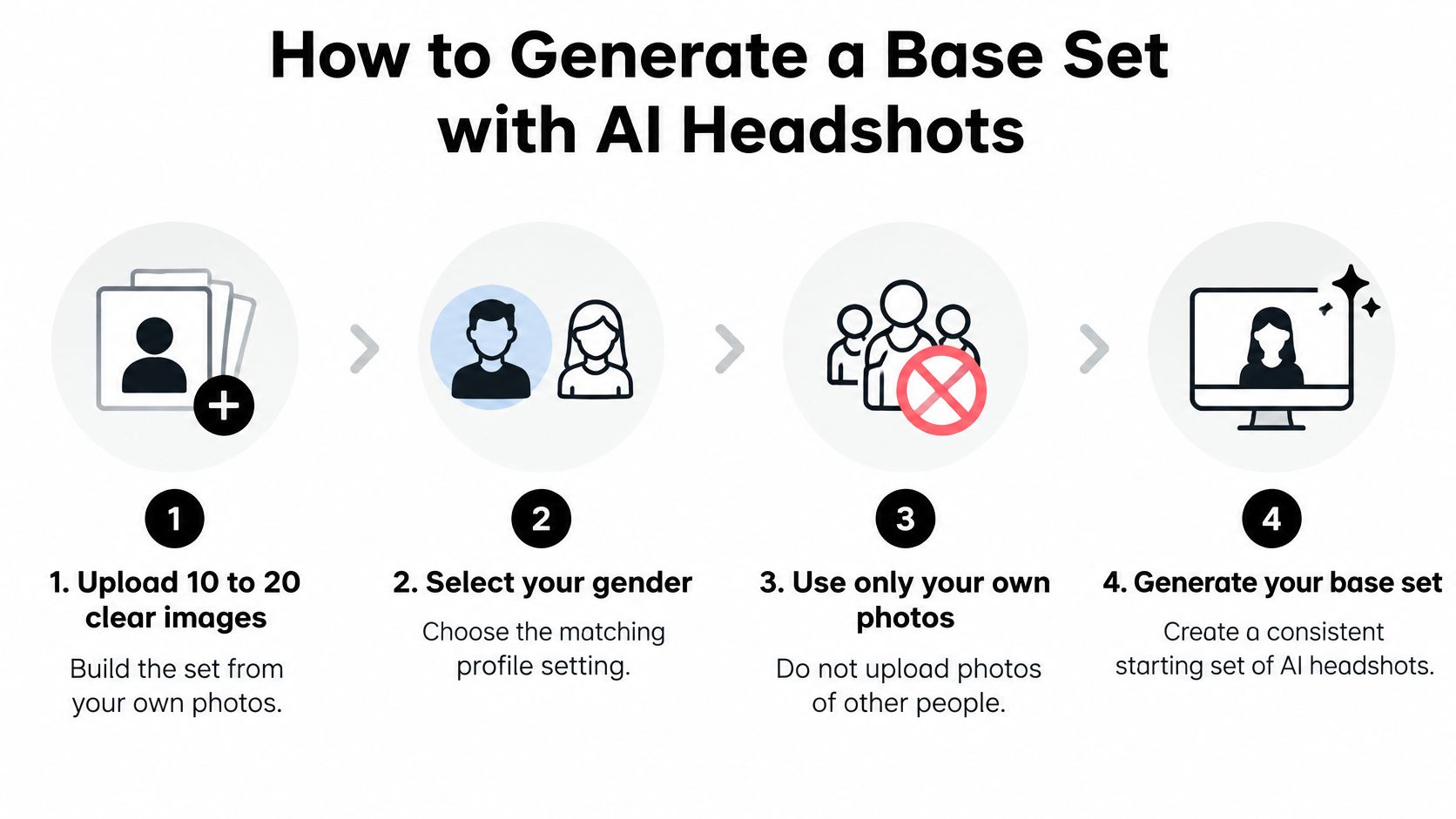
Build before you customize
- Gather clear, recent references. Choose 10 to 20 well-lit images with varied angles, uncovered eyes, and no hats obscuring your hairline. Include natural facial detail rather than filtered images, because variation should help describe your face, not introduce competing versions of it.
- Upload your images and select your gender. Check the upload selection before continuing, especially if your camera roll contains older grooming styles. Removing an unsuitable reference now is easier than sorting through outputs influenced by it.
- Choose your primary casting type. Decide whether your priority is corporate, everyman, romantic lead, antagonist, or commercial. This prevents an otherwise polished batch from being dominated by styling you won't use.
- Generate and shortlist for likeness. As a practical working target, keep roughly 10 to 15 candidates if that many resemble you. Don't fill the shortlist to meet a quota, and don't promote an impressive image whose face feels unfamiliar.
- Select the identity anchor. Pick the candidate with the most faithful face shape, eye spacing, hairline, and apparent age. A neutral expression makes comparison easier because a dramatic smile or tense jaw can obscure structural differences.
- Save the base set untouched. Keep approved originals separate from working edits and exported submissions. Returning to a clean base is quicker than trying to reverse a chain of unwanted changes.
What belongs in the first shortlist
Look for a face you'd recognize in person, believable lighting, and clean detail around the ears and hairline. If hands appear unexpectedly in a tight headshot, choose a cleaner composition instead of spending time repairing an unnecessary element.
Compare each candidate with your uploaded references, not merely with the other generated images. A whole batch can look internally consistent while still missing your actual appearance.
Our workflow makes variation convenient. Your selection discipline makes that variation useful: keep the recognizable man, then change only what helps casting place him.
Casting Looks and Expressions to Generate per Type
Bernard Hiller's Hollywood acting industry statistics reported the average working actor as 42 years old in 2025. You don't need to generate youth to generate opportunity. Build around the age range you play.
Use these options as casting decisions, not a checklist of identities to collect.
Looks and expressions by casting type
The distinction should remain visible when the portraits sit together.
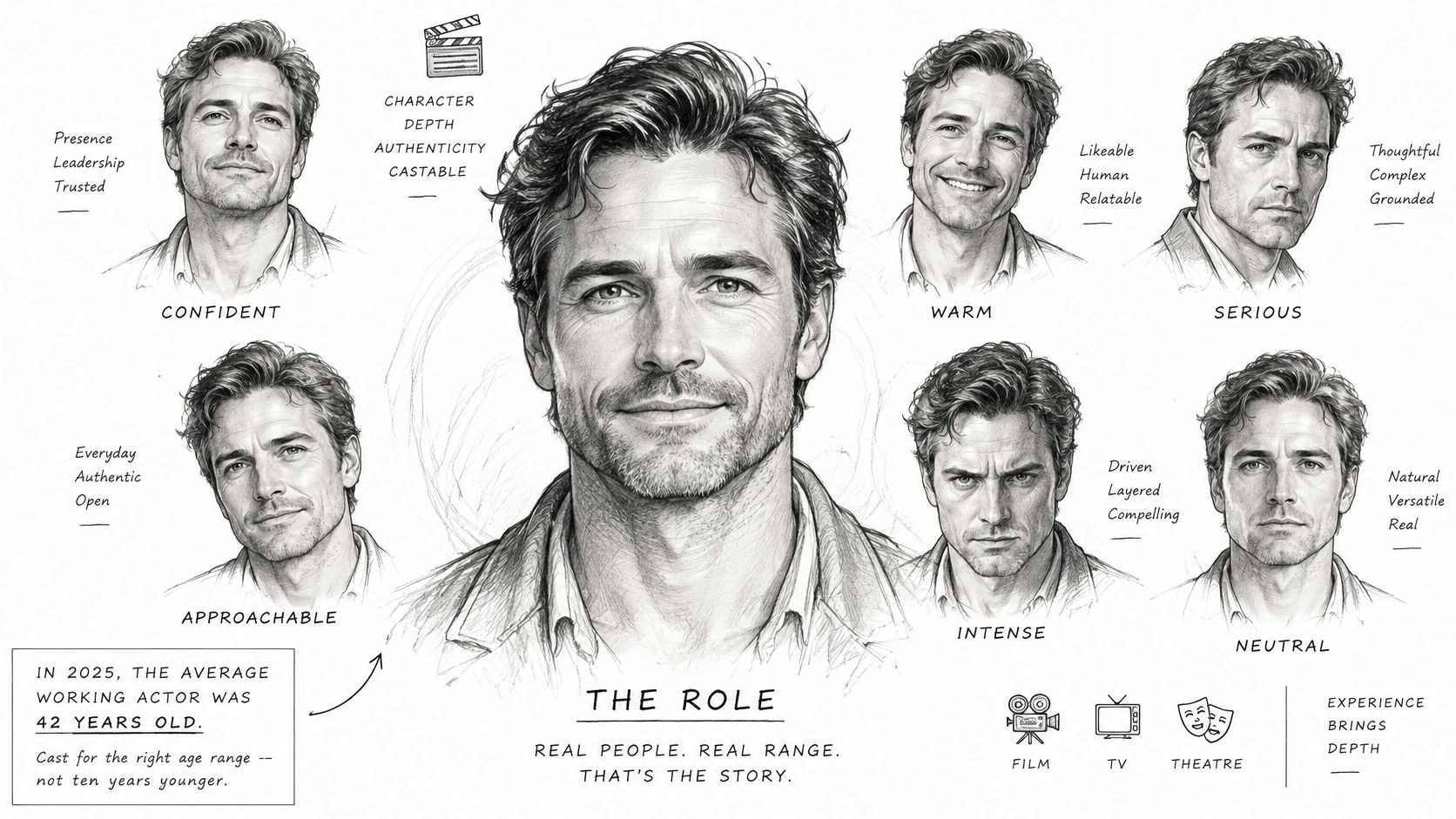
Choose the roles, then the styling
- Corporate professional: Keep the collar and posture composed. Choose this for credible workplace authority without full executive formality.
- Everyman or blue-collar: Let the henley and direct gaze establish accessibility. Choose this for grounded, everyday characters.
- Romantic lead: Relax the brow rather than asking for a different face. Choose warmth and emotional availability.
- Antagonist or heavy: Preserve detail in darker lighting. Choose controlled intensity, not exaggerated menace.
- Doctor, lawyer or executive: Use tailoring without unnecessary props. Choose professional status that reads immediately.
- Commercial or warm: Let a genuine-looking smile lead. Choose approachability rather than glamour.
For a hypothetical actor playing both bank managers and friendly dads, a useful selection might include two corporate options and two commercial options rather than eight nearly identical portraits. Aim editorially for four to six distinct looks, balancing serious and warm expressions.
Our acting headshot posing guide can help you describe posture and expression more precisely, reducing trial-and-error prompts.
Keep specialty character concepts separate. If a generated horror portrait inspires an eventual costume involving lenses, Style Site Optical's resource to find safe Halloween contact lenses is relevant to that preparation, not permission to alter your eyes in a conventional casting image.
If you don't audition for the role, don't generate the look.
How to Check, Edit and Export Your Final Files
An AI portrait isn't ready because it looks convincing at gallery size. Inspect the actual file before sending it to anyone.
The SAG-AFTRA Awards rules and regulations specify color images with at least 1,800 pixels on the longest side, 300 dpi, and JPG, PNG, or TIFF formats. That's an awards specification, so use it as a delivery reference while following the receiving platform's requirements.
Inspect before you export
- Open each candidate at 100% zoom. Inspect skin tones, hair detail, eye sharpness, and halos around the shoulders, because gallery previews can conceal defects.
- Reject altered anatomy and overprocessing. Excess smoothing, whitened eyes, a redesigned jaw, and brittle sharpening make an image less useful even when it initially looks polished.
- Make a targeted edit, then compare. Replace the jacket or background without requesting unrelated changes, so you can identify exactly what improved or went wrong.
The checklist keeps rejection decisions straightforward.
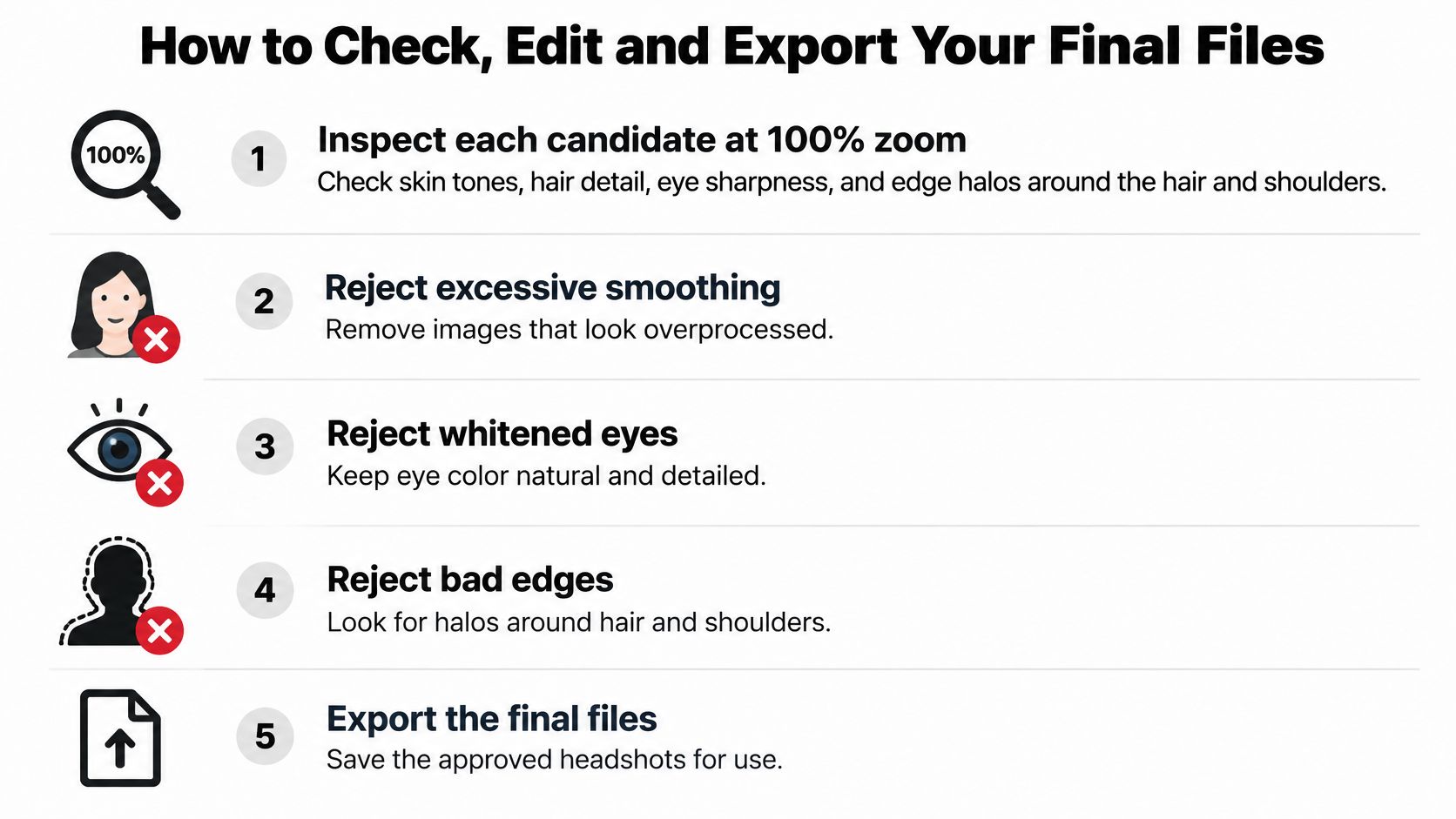
Package approved images clearly
- Save a high-resolution master. Use the print-ready dimensions in your production spec where the output supports them, and inspect any upscale rather than assuming a larger file contains better detail.
- Create the online JPEG. Compress a copy to fit the destination's limits, preserving the original so a small upload file never becomes your only version.
- Name files for the recipient. A filename such as
marcus-reed-romantic-lead-2026-03.jpgidentifies the actor, look, and version more clearly than an automatic download name.
Our editing workflow is most useful when you stop as soon as the image meets its purpose. Don't keep polishing skin or eyes merely because another adjustment is available.
Costume portraits can supplement your materials, but keep a conventional headshot available whenever costume makes you difficult to recognize. A role-specific image shouldn't leave casting guessing who's underneath it.
Finish on your phone: view the exported file as a thumbnail, open it, and confirm that compression hasn't damaged the face. Approve the export, not just the gallery preview.
Fixing Identity Drift in AI Actor Headshots
The most troublesome AI error isn't always an obviously broken ear. It's a face that gradually stops being yours as you regenerate.
A persistent-identity benchmark describes an evaluated method's identity score falling from approximately 0.79 to 0.70 across repeated edits. That finding supports a practical precaution, not a prediction of how every tool performs: preserve a strong base and avoid treating each edited result as a fresh starting identity.
The visual warning is gradual change across otherwise plausible portraits.
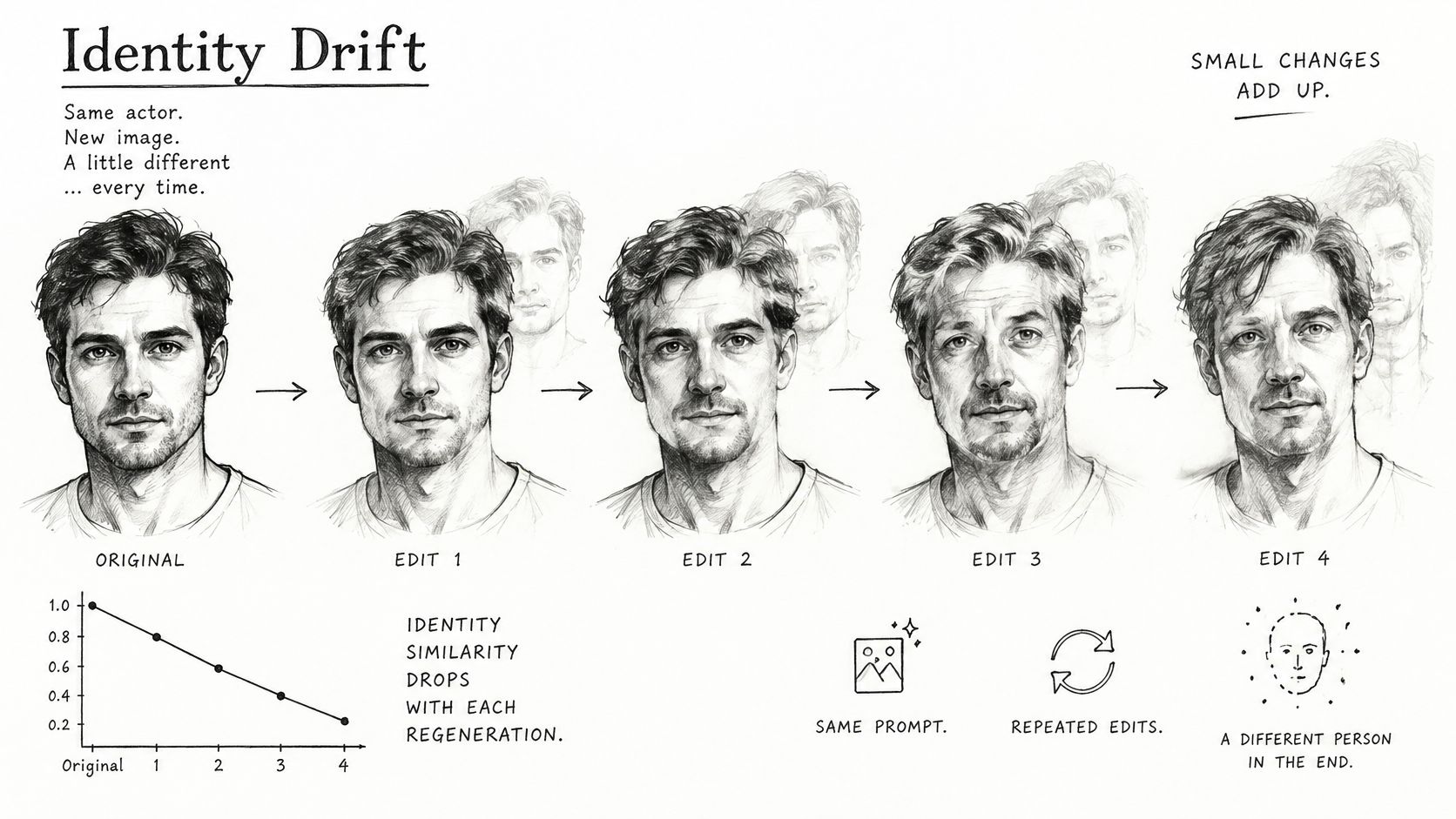
AI headshot symptoms, causes and fixes
A tighter crop is useful only when it retains enough detail and context. Don't crop so aggressively that the tool has to reconstruct missing facial information.
Check what you didn't ask to change
Diffusion-based image-editing research describes a trade-off in which stronger instruction guidance can improve the requested change while allowing changes to spread into unintended regions. A successful hair edit therefore isn't automatically a successful headshot edit.
For example, suppose you test a period haircut and get convincing hair but narrower eyes and a squarer jaw. Reject the result, return to the anchor, and simplify the request. Don't try to repair that altered face through another whole-portrait regeneration.
Use our quality assurance standards to make acceptance decisions consistent. Compare the anchor and candidate side by side, paying attention to eye spacing, nose shape, jaw contour, and apparent age.
Small clothing or background changes can be quicker to review than a fresh batch because there's less to assess. The time-saving principle is simple: stop rebuilding the face once you have a faithful one.
Confirm Your Set and Start Submitting This Week
Choose a compact working library rather than downloading everything into your submissions folder. As an editorial target, eight to twelve approved images can accommodate useful alternatives without forcing you to sort through near-duplicates whenever a notice arrives.
That library isn't the same as your public-facing selection. Keep a serious theatrical option, a warmer commercial option, and a tight head-and-shoulders image for each casting category you actively pursue.
Approve the set as a whole
- Check consistency: Every image should look like the same current man, even when the styling changes.
- Confirm delivery: Crops, file formats, filenames, and platform requirements should all be settled.
- Remove redundancy: Keep an alternative only if it supports a different casting decision.
- Follow submission rules: Don't send generated images where the recipient prohibits them or requires another kind of material.
You hold all rights to the headshots you generate through Secta's AI, but they cannot be sold or used for the benefit of any third party, so keep them for your own auditions, portfolio, and agent submissions.
Review the library whenever your hair, facial hair, weight, or overall appearance changes enough to make the images misleading. Don't wait for a callback to discover that your best-looking portrait represents an earlier version of you.
Upload your own current reference photos to Secta Labs today, choose the casting types you pursue, and generate your starting set in a single session. Our Special Offer promises AI-generated professional headshots in under an hour. Reserve time afterward to select, inspect, and export the recognizable images you can confidently put in front of casting this week.