Professional Image Consulting That Actually Works
You're about to join a client call, update LinkedIn, or send a proposal, and the same problem appears in the corner of your screen: your profile image no longer represents the professional you've become. The lighting is flat, the expression feels forced, and the clothes belong to an earlier role. You can fix that faster than you think, but only if you treat your image as a business asset rather than a vanity project.
Professional image consulting now combines traditional advice on wardrobe, grooming, and personal branding with generative AI portraits that make visual updates quicker and easier. A consultant can define the message you need to project. AI can help you produce consistent portraits for LinkedIn, company pages, speaker bios, and social profiles without organizing a full photography session.
The Moment You Realize Your Image Is Holding You Back
A mid-career consultant notices the problem after a promising conversation. The prospect has viewed their LinkedIn profile, but the consultant's headshot shows an old hairstyle, a casual shirt, and a background that looks like a holiday rental. On Zoom, the thumbnail is even worse. The face is shadowed, the crop is awkward, and the image makes the consultant look less prepared than they are.
A different professional sees the issue in a conference registration preview. Their suit is technically fine, but the portrait is inconsistent with the polished identity on their website. A client may not consciously analyze the mismatch, yet every visual signal contributes to whether the person appears established, current, and ready for a serious conversation.
That's what professional image consulting should solve. It isn't about turning every executive into the same polished stereotype. It's a practical system for aligning appearance, communication, and professional identity across the places where people encounter you before they speak with you.
Transforme a sua imagem profissional
Obtenha instantâneos profissionais impressionantes gerados por IA em menos de uma hora. Carregue selfies normais ou fotografias de grupo, escolha entre mais de 100 estilos e nós criaremos centenas de fotografias perfeitas que representam o seu melhor.
Image is a recurring business asset
Your headshot works like a website, email signature, or business card. It appears in contexts you don't control, and it keeps working after you've forgotten when it was created. Careers change, responsibilities expand, and platforms demand different formats. A portrait that suited an individual contributor may feel wrong when that person becomes a department leader, founder, speaker, or client-facing specialist.
The market reflects that broader use. The global image consulting market was valued at US7.32 billion by 2032, implying a 7.2% compound annual growth rate across the forecast period, according to Coherent Market Insights' image consulting market analysis. A separate estimate puts the personal image consultants market at US5.1 billion by 2032 and a reported 9.4% CAGR from 2024 to 2031 in Verified Market Reports' market estimate.
Those figures matter because they show image work moving beyond one-off luxury styling. Professionals need repeatable updates for new roles, new audiences, new platforms, and new campaigns. The modern service has four connected pillars: wardrobe, grooming, personal branding, and headshots.
What Professional Image Consulting Actually Covers
A useful engagement starts with diagnosis, not shopping. The consultant should examine how you currently appear, where your image is inconsistent, and what each audience needs to understand about you.
Wardrobe and grooming establish the visual foundation
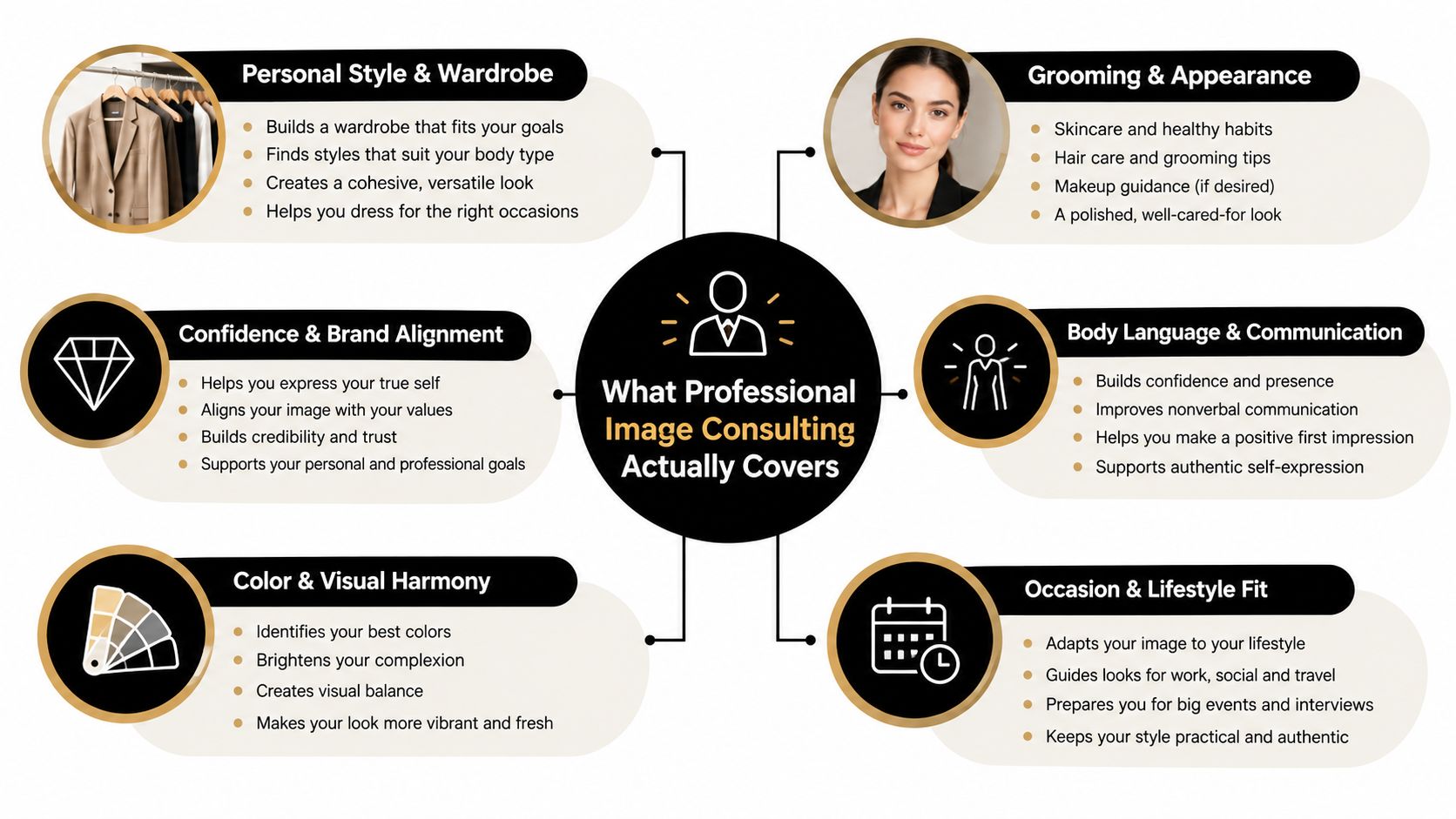
Wardrobe consulting covers color analysis, fit assessment, capsule building, and outfit formulas. A consultant might separate your clothes into reliable combinations for client meetings, conference stages, internal leadership meetings, and informal networking. The goal isn't a larger closet. It's a smaller set of combinations that communicate the right level of authority and approachability.
Grooming includes skincare, haircut decisions, glasses frames, and beard shaping. These details affect how clearly your face reads in a generated portrait, particularly around the eyes, jawline, and hairline. The right guidance preserves your identity while making the image easier to use across professional channels.
A strong wardrobe and grooming brief should produce decisions you can repeat. You should know which jacket shapes work, which colors support your brand, and which grooming choices remain consistent between portrait updates.
Branding and portraits turn advice into assets
Personal branding translates style choices into a visual language. That may include a restrained color story, a signature accessory, a preferred background tone, and guidance for LinkedIn, your website, speaking decks, and media profiles. For a practical framework on connecting appearance with broader positioning, explore Gainsty personal brand tips.
Headshots are the final expression of that system. Traditional work may include photographer selection, styling, expression coaching, and retouching. A generative AI workflow can then produce additional portrait variations that follow the same identity and brand direction without requiring another appointment.
Sequence matters:
- Audit the current image: Review profiles, portraits, wardrobe, grooming, and audience expectations.
- Set the visual strategy: Define the role, message, colors, level of formality, and portrait use cases.
- Prepare the person: Select clothing, refine grooming, and remove choices that create inconsistency.
- Generate or capture portraits: Produce images only after the visual direction is clear.
- Deploy and review: Update profiles, bios, signatures, and team pages, then check whether the system is being used.
Most engagements underdeliver because they jump from conversation to recommendations. A vague Pinterest board isn't a wardrobe system, and a gallery of attractive portraits isn't a brand strategy. You need written choices, usable image files, and a clear plan for applying them.
Business and Personal Benefits You Can Measure
A stronger portrait removes friction before a conversation begins. It helps a recruiter, prospect, conference organizer, or potential partner recognize you as current and intentional. The effect won't be identical across industries, but the underlying advantage is practical: people can understand your role faster when your visual presentation matches your professional context.
A 2026 analysis found that only about half of LinkedIn users had a professional headshot, while others used selfies, casual images, blurred photos, or no photo at all, according to Prime Headshots' LinkedIn headshot trends analysis. The same analysis indicates that finance, law, consulting, and banking tend to have stronger headshot adoption, while technology and other less client-facing fields lag. That's why generic advice fails. A suitable portrait for a software engineer doesn't need the same signals as one for a private banker.
Where the return appears
The research on portrait aesthetics supports a technical rather than identity-changing approach. A study found that photographic beauty was largely uncorrelated with race, gender, and age, while quality ratings were strongly associated with facial landmark sharpness, contrast, exposure, illumination pattern, homogeneity, uniqueness, and originality, as described in research on digital portrait aesthetics. In other words, better professional portraits come from controlling capture and rendering variables, not from trying to erase the features that make you recognizable.
That can affect personal confidence too. A portrait that feels accurate is easier to use on a dating profile, speaker page, community site, or social account because you aren't constantly explaining the gap between the image and the person. Appearance routines can also support confidence in other ways, and readers interested in the time and self-care angle can explore confidence through laser hair removal.
The investment compounds because the same image system can support many interactions over time. A current portrait won't guarantee a promotion or a new client, but an outdated or careless one can create avoidable doubt at every touchpoint.
How to Choose the Right Consultant or Service
Choose the specialist based on the problem, not the label. An executive presence coach is appropriate for a C-suite transition. A personal stylist is better for a wardrobe overhaul. A branding consultant makes more sense when your LinkedIn profile, website, and messaging feel disconnected. A hybrid provider should explain which parts require human judgment and which parts use AI headshot or digital styling tools.
Start with credentials and relevant experience. Look for certification from the Association of Image Consultants International, or an equivalent professional body, then inspect the portfolio for people in your industry. A consultant who mainly styles entertainers may not understand the restraint required in banking, law, or enterprise sales.
Demand a structured process
The first meeting should include a diagnostic assessment of your body proportions, color palette, current wardrobe, grooming choices, professional goals, and brand positioning. If it's only small talk followed by a recommendation to buy expensive clothes, leave.
Ask for sample deliverables. A serious wardrobe audit should produce categorized inventory, outfit formulas, shopping priorities, and usage guidance. A branding engagement should specify the profile assets you'll receive. For portraits, clarify whether you'll get one final image or a usable set for LinkedIn, bios, directories, and campaigns.
Pricing should be itemized before work begins. Timelines should be written down. Success metrics should be concrete, such as updated portraits, a style guide, revised profile assets, and a 30-day check-in to assess adoption.
If you're comparing remote options, this guide can help you find a personal stylist online. The right service should make your decisions easier, not create another stream of confusing recommendations.
Pricing, ROI, and the Real Cost of Looking the Part
Traditional image consulting can be valuable, but it often breaks down for busy professionals because the process is slow, expensive, and tied to a single milestone. Wardrobe fitting, color analysis, grooming coaching, and executive presence work still benefit from human expertise. The portrait layer doesn't always need the same delivery model.
The assigned package figures often used in the market place a single wardrobe audit at 800, full personal shopping and styling at 5,000, and executive branding engagements with headshots, copy, and media training above $7,500. Those figures aren't verified in the provided sources, so treat them as planning categories rather than facts. The important point is the cost structure: traditional work charges for time, appointments, travel, fitting, and production.
Compare the outcome, not just the fee
The ROI is easiest to defend when the image problem is specific. Recovering value from unworn clothes, preparing for a leadership transition, or replacing an outdated digital presence can justify human support. But paying for a full photoshoot every time your role, hair, glasses, or brand palette changes is inefficient.
Secta Labs is one example of an AI portrait service that turns uploaded personal photos into professional headshot variations, with editing options for clothing, expressions, backgrounds, hair, lighting, upscaling, and retouching. Its workflow is relevant when you need the digital presence layer refreshed quickly, while a consultant handles decisions that require tactile judgment.
For a useful breakdown of professional portrait pricing models, see this guide to the cost of professional headshots. My recommendation is simple: spend human budget on strategy, wardrobe, grooming, and positioning. Use generative AI portraits when the bottleneck is speed, consistency, or the need to produce several channel-ready images without another appointment.
How AI Headshots Deliver Consistent Portraits in Minutes
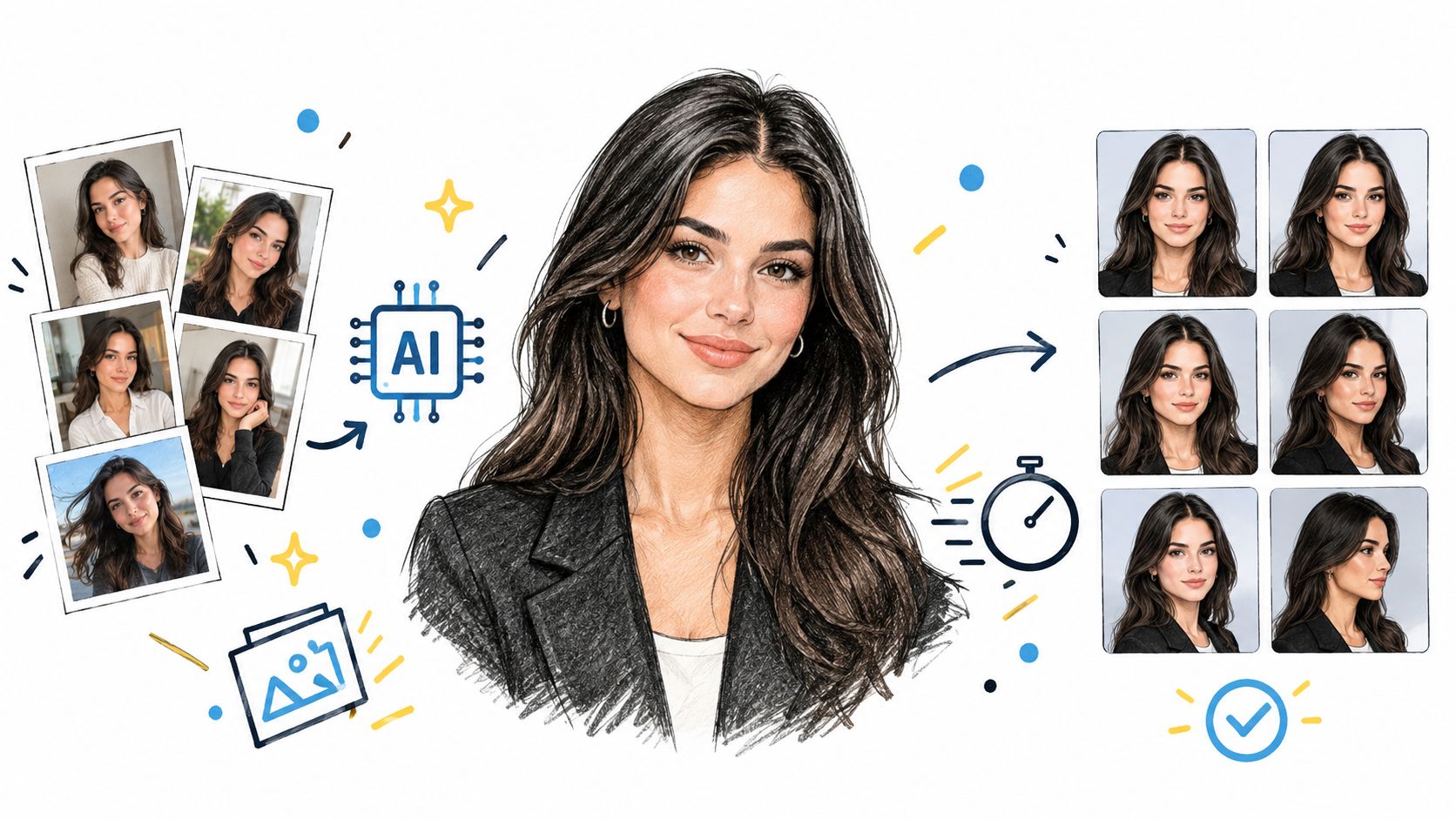
Generative AI headshot platforms compress a process that traditionally requires scheduling, travel, styling, shooting, selection, and retouching. You upload a set of personal photos, define the visual direction, and receive portraits that can be tested across professional contexts.
The workflow starts with identity, not stock imagery
A typical process has three parts:
- Upload source photos: Use clear personal images with varied angles and expressions. The quality benchmark PIQ23 contains 5,116 images across 50 predefined portrait scenarios captured on 100 smartphones, which illustrates why portrait quality depends on device, lighting, pose, and scene variation rather than resolution alone, as documented in the PIQ23 portrait benchmark.
- Choose a visual direction: Select a corporate, creative, warm, high-contrast, or similarly defined style that fits your role and brand.
- Review and refine: Compare generated options, reject awkward expressions, and adjust clothing, background, grooming details, or lighting where the platform allows it.
Some AI headshot services use uploaded images to train a private, customer-specific model. One provider describes collecting 10 to 20 selfies for that purpose and generating the image pack from the customer's private model, as explained in its AI headshot privacy policy. That private workflow helps the outputs remain connected to the same person instead of resembling generic stock portraits.
The technical objective is consistency. Your LinkedIn portrait, company biography, speaker profile, and email signature should look like the same professional, even when the crop, background, expression, or outfit changes. The platform can handle lighting correction, background replacement, wardrobe refinement, and expression tuning, but your initial brief still matters. If your brand calls for calm authority, don't select an exaggerated smile and dramatic lighting just because the image looks attractive in isolation.
Privacy and rights require deliberate choices
Read the vendor's terms before uploading personal images. HeadshotPro states that user input photos and generated headshots aren't used to train or retrain its models, and that processing is limited to providing, maintaining, securing, and supporting the service, according to its terms and conditions.
You also need rights clearance. Adobe's Generative AI User Guidelines prohibit content that violates copyright, privacy, publicity, trademark, or other third-party rights. Google's generative AI policy similarly restricts the use of personal data or biometrics without legally required consent. For a company rollout, obtain permission from employees, document the approved use, and avoid generating portraits that misrepresent someone's identity or role.
For businesses comparing workflows, this guide to an AI headshot generator for business is useful when planning profile updates across departments. The value is operational: people can refresh portraits from home, teams can follow a shared visual direction, and marketing can replace inconsistent images without arranging another portrait day.
DIY Upgrades That Work Without a Consultant
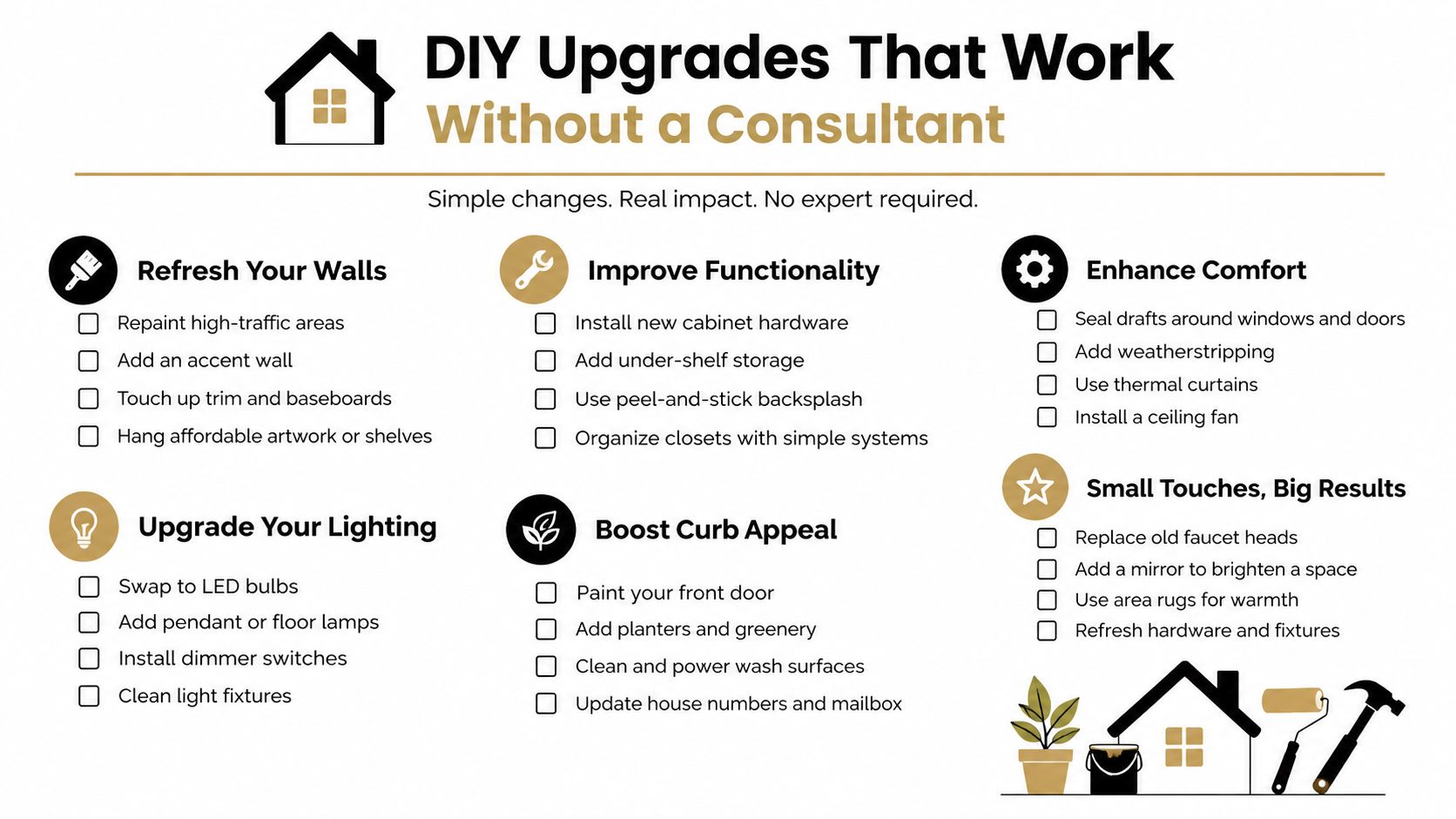
You don't need a luxury engagement to improve your professional portraits. You need a defined visual brief, a few dependable clothing choices, clean grooming, and a fast way to produce images that work across your profiles.
Start with wardrobe triage. Pull out two neutral jackets, one crisp shirt, and one solid tee that fit well, travel easily, and don't create distracting patterns on camera. Test the neckline and shoulder line in a phone preview. If the garment bunches, shines heavily, or disappears into the background, remove it from the portrait plan.
Improve the source material
Schedule grooming so your haircut and facial hair look intentional rather than freshly altered. Use simple skincare that reduces visible shine under office lighting, and check whether your glasses frames disappear against your hair or create strong reflections. You're not trying to become someone else. You're removing distractions that make the face harder to read.
For a home setup, use a north-facing window, a plain wall, portrait mode on your smartphone, a phone tripod, and a self-timer burst. Vary the angle and expression while keeping the light consistent. A clean source set gives a generative tool more useful information than a collection of dark, heavily filtered selfies.
Use this guide to do-it-yourself photos when you need a practical source-image workflow. Then apply a strict deployment checklist:
- LinkedIn: Replace the profile portrait and check the crop on mobile.
- Email signature: Use the same identity and a restrained image size.
- Conference bios: Select a portrait with enough surrounding space for different layouts.
- Company pages: Match the image style used by colleagues and leadership.
- Slack and internal tools: Update the places where coworkers see you every day.
- Press and speaker materials: Keep a small approved set with clear filenames.
AI portraits can compress lighting, retouching, wardrobe testing, and background changes into a short workflow. They won't replace a consultant who needs to assess color harmony, rebuild a closet, or coach executive presence. Escalate when your problem is strategic or physical. Stay self-directed when the problem is that your current portrait is old, inconsistent, or impossible to use.
The practical answer is a hybrid one. Let human advice define how you should present yourself, then use generative AI portraits to update that presentation quickly across the places that influence professional decisions.
Your image is already working while you read this. Audit your current LinkedIn and company portraits today, identify the role and audience you need to represent, and create a short brief covering clothing, grooming, background, and expression. Then use Secta Labs or another privacy-transparent AI headshot service to produce a consistent portrait set, update your profiles, and schedule a review after your next career or brand transition.