What Do I Look Like in the Future? an AI Guide for 2026
If an AI portrait looks convincingly older, does that mean it has shown you your future, or just made a convincing stranger? That's the gap behind what do I look like in the future. A useful answer needs more than wrinkles and gray hair. It needs your recognizable identity, a clear purpose, and a review process that catches changes you never asked for.
What Your Future Look Really Shows
A future-look image is a generated scenario, showing your face at a later age or in a chosen style. It isn't a forecast. Think of the difference between a weather forecast that predicts an outcome and a climate map that illustrates plausible conditions. Your future portrait is closer to the map, shaped by your reference images and the settings you choose.
Say you're a consultant exploring a later-career identity. You might generate portraits with graying hair, mature skin texture, and understated executive clothing. Those choices help you explore a direction without claiming that your face, health, or career will develop that way.
Age-inclusive portraits deserve serious attention. The World Health Organization projects that the population aged 60 and older will rise from 1.0 billion in 2020 to 2.1 billion by 2050, roughly one in five people globally, while the population aged 80 and above is projected to triple between 2020 and 2050. Professionals, actors, and creators need ways to represent later life stages without treating youth as the only desirable appearance.
Verändern Sie Ihr professionelles Image
Erhalten Sie atemberaubende KI-generierte professionelle Fotos in weniger als einer Stunde. Laden Sie normale Selfies oder Gruppenfotos hoch, wählen Sie aus über 100 Stilen und wir erstellen Hunderte von perfekten Aufnahmen, die Sie von Ihrer besten Seite zeigen.
Keep visualization separate from treatment decisions
If your interest in future portraits overlaps with appearance treatments, ProMD Health's resource to compare fillers, lasers, and peels provides separate context. Don't interpret an AI-generated face as a preview of a treatment result.
For portrait generation, write down the purpose before choosing the appearance. A personal aging exploration, a casting concept, and a professional profile require different decisions. That simple distinction makes it easier to select a suitable generation method and reject attractive but irrelevant results.
Comparing Future-Look Methods Side by Side
Future-look methods compared: use identity control and intended use to make the decision, not how dramatic the transformation looks.
A generic age filter is suitable for curiosity. Treat its output as an effect rather than a professional asset, especially if you can't independently control the face, expression, and setting. A strong transformation isn't useful if colleagues wouldn't recognize you.
An identity-preserving AI studio is the better route for reusable professional portraits. You can explore clothing, lighting, expression, and background within a connected workflow rather than building each variation separately. The traditional option in the table provides a boundary: when an image must document an actual moment, a generated portrait isn't the right substitute.
Preference doesn't remove the need for transparency
In a 2024 Ringover survey of 1,087 U.S. recruiters, reported by BetterPic, 76.5% preferred AI-generated headshots over traditional photographs in blind comparisons. Recruiters correctly identified AI headshots only 40% of the time, according to Ringover's survey as reported by CompanionLink. These findings describe survey judgments, not guaranteed hiring outcomes.
The practical gap is access to a usable professional image. In 2025, 43% of U.S. adults said they lacked a professional headshot, according to a Harris Poll commissioned by PhotoPacksAI. An AI portrait workflow addresses that need by making presentation changes easier, but the customer still needs to approve the likeness.
- For a curious preview: Choose a filter and keep expectations modest.
- For a profile update: Choose an identity-preserving studio and review the result carefully.
- For a portfolio refresh: Generate purpose-specific variants while retaining an unaltered reference image for records.
How AI Builds a Portrait of You Later
A portrait model studies visual patterns somewhat like a sketch artist studies a sitter before drawing variations. The analogy helps explain the workflow, but the system isn't reasoning about your personal future. It generates an image from learned patterns, your reference material, and your chosen direction.
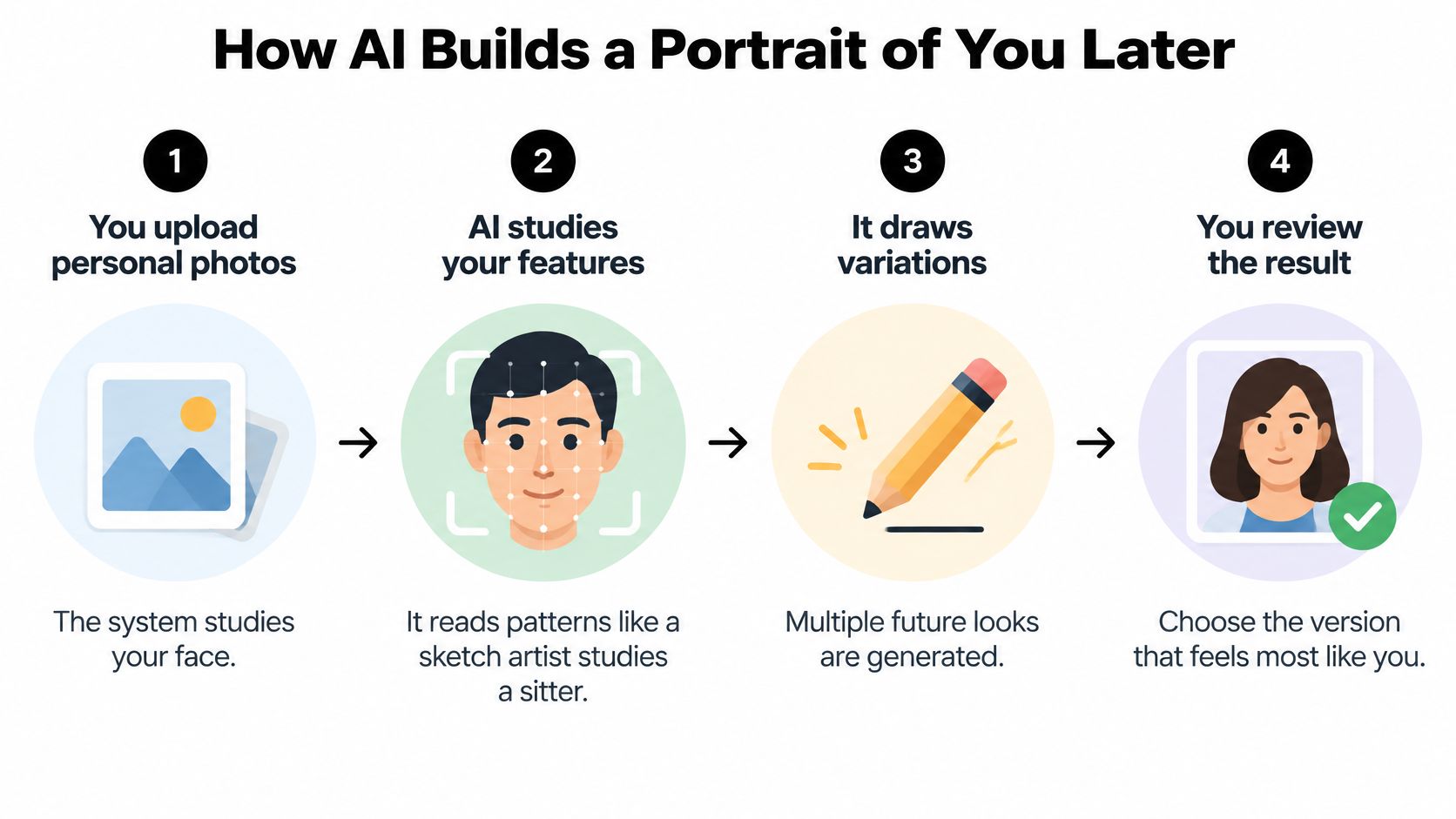
From reference images to controlled variations
- You upload personal images. A collection gives the system views of your face across angles and expressions. Choose clear inputs that represent your current appearance rather than heavily edited versions of yourself.
- The platform personalizes the model. At Secta, we retrain a copy of the Stable Diffusion neural network using your uploaded images, then generate headshots with that personalized copy. This connects generation to your likeness rather than relying only on a written description.
- The model generates variations. Clothing, backgrounds, lighting, and expressions can change while the face remains the identity reference. A narrow direction, such as a relaxed expression against a restrained office background, gives you a more useful selection than an unrestricted makeover.
- Selected images receive higher-resolution detail. This step prepares the output for closer inspection and professional use. More detail should help you inspect the face, not distract you from an incorrect likeness.
- You review and select. Keep the result that resembles you, not just the most flattering face. Reject an image when the requested setting works but the person doesn't.
Our AI headshot generator guide offers additional context for choosing inputs and understanding the generation workflow.
Identity and styling are different jobs
Facial proportions, skin tone, and distinctive features should remain stable while presentation changes. That separation is what makes a collection useful: you can select different professional looks without appearing to become a different person.
The InstaFace framework paper describes an approach combining facial-recognition embeddings with vision-language features to support identity-preserving edits from a single reference image. It illustrates a technical route to controlling pose, expression, and lighting, not a guarantee that every portrait service works the same way.
For clothing-led concepts, WearView's ai model photoshoot resource provides context on generative styling workflows. Keep that styling task separate from identity approval. Automating the variations makes exploration quicker; your final review determines whether the output is usable.
How Accurate a Future Portrait Really Is
AI can alter presentation while keeping you recognizable, but more editing doesn't necessarily produce a better likeness. An image can become more polished and less accurate at the same time. Judge accuracy against your reference face, not against how convincing the generated skin looks.
A study of facial-attribute editing evaluated 26 semantic, demographic, and expression-related attributes using ArcFace and AdaFace across CelebA, CelebAMask-HQ, and LFW. Several edits substantially degraded automated face matching, including edits made with identity-preserving generative models. That finding supports restrained editing, not blind confidence in an identity-preservation label.
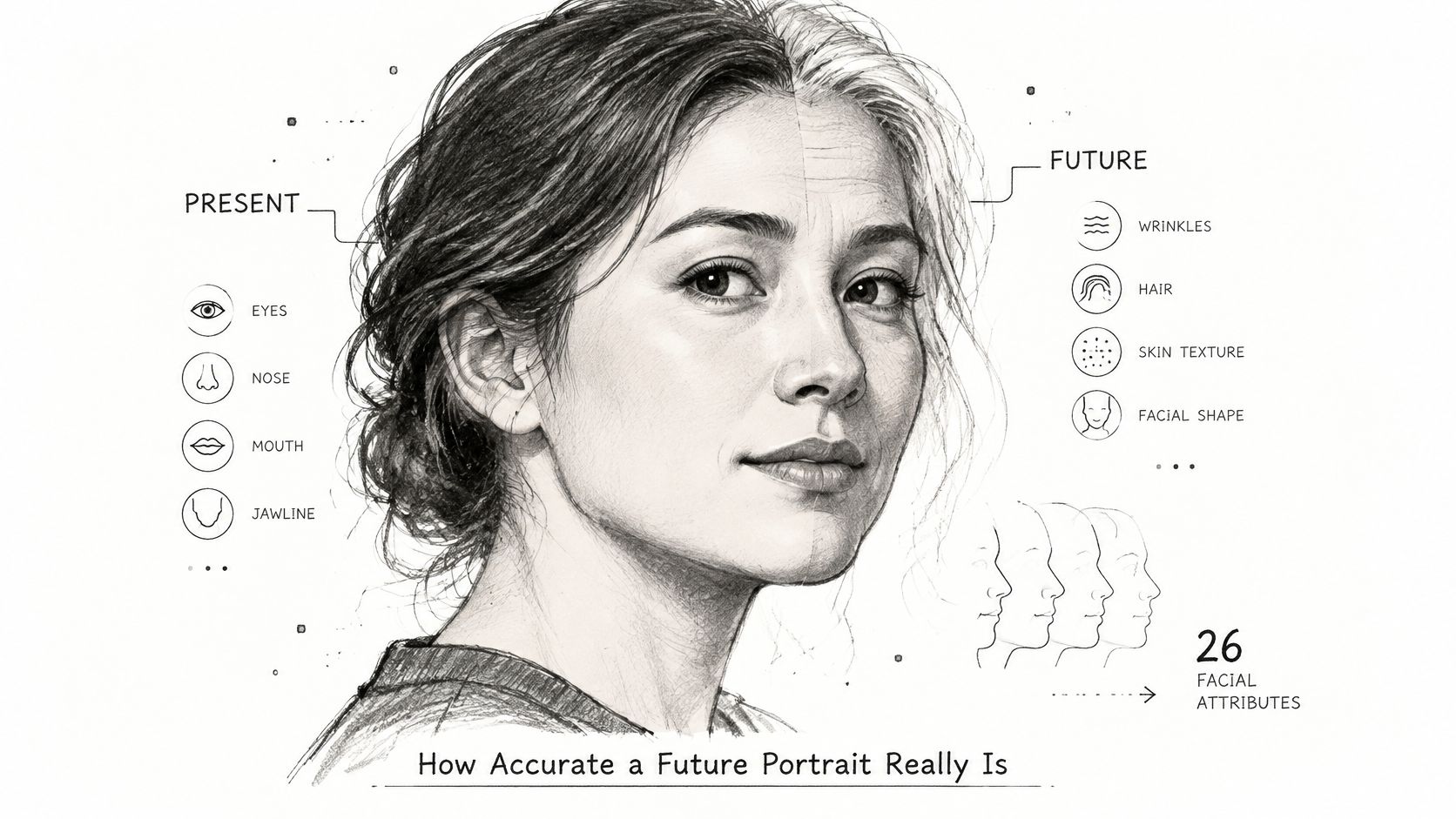
Repeated editing is like photocopying a photocopy: it's a useful way to think about how deviations can become harder to notice. The analogy isn't a technical description of every model. The practical lesson is to return to the original reference instead of approving each new version against the last edited version.
Run the same identity check every time
Open the reference and generated portrait side by side at a comparable face size. Inspect structure before styling, then compare the image at the smaller size your audience will see.
- Eye spacing and shape: Check the distance between the eyes, eyelid contours, and any natural asymmetry. Reject enlargement that changes your expression.
- Face shape: Compare cheek width, jaw contour, chin length, and nose proportions. A sharper jaw isn't an improvement if it isn't yours.
- Hairline: Look at the temples, forehead boundary, parting, and visible density. Don't let an invented hairline pass as a styling adjustment.
- Skin tone: Check undertone and overall complexion, allowing for lighting without accepting unexplained lightening or darkening.
- Apparent age: Assess texture, facial volume, and hair together. Wrinkles alone don't establish a coherent later-life appearance.
Use a rejection rule, not a beauty score
Limit each review round to one or two targeted changes, such as expression and clothing. That's a workflow recommendation, not a promise that a particular edit count guarantees accuracy.
Say a generated executive portrait has excellent lighting but a narrower nose. Reject it rather than spending more time perfecting the background. A controlled workflow gets you to a useful portrait faster because you stop refining outputs that failed the identity check.
Future Looks Matched to Your Career
Future-look variants by career goal: these are starting directions for generated portraits, not rules about what people in each profession should look like. Lighting can support a visual tone; it cannot prove trustworthiness or competence.
The Look the Part paper examined 63,014 completed freelance jobs involving 2,042,198 applications from 160,160 freelancers and found an association between perceived visual role fit and hiring. Its discussion also describes an experiment in which smiling software-developer models received higher competence ratings than neutral models, while a thinking pose received the lowest ratings. These are findings about perception, not evidence of anyone's actual ability.
Build variants around the audience's task
A prospective consulting client needs to recognize you and understand your professional context. A casting reviewer needs a usable view of your appearance and range. Those audiences shouldn't receive the same generic best-looking portrait.
For a practical starting set, generate an approachable LinkedIn option, a restrained client-facing option, and a role-appropriate portfolio variation. Keep the identity reference fixed and change the presentation deliberately. Our guide to professional headshots for work helps connect those choices to workplace uses.
- For client-facing work: Favor a natural expression and an uncluttered setting. Don't generate signage, credentials, or office details that imply affiliations you don't have.
- For performance portfolios: Explore expression and atmosphere without changing facial anatomy or hiding your actual appearance.
- For teams: Agree on framing, background family, and lighting direction, then let individuals retain natural differences.
Controlled AI generation saves effort. You can compare context-specific options within a shared workflow rather than reinventing the entire portrait for each channel. Change the presentation, not the person.
Privacy, Consent and Fair Representation
A future portrait is a designed scenario, so label it accordingly wherever someone could mistake it for a documentary image. Disclosure belongs near the image or in clearly associated profile information, not buried where viewers won't find it. A suitable description is AI-generated portrait or AI-generated age-progression concept, depending on its purpose.
The risk isn't only mistaken identity. A study of 13,200 synthetic faces found that text-to-image systems associated attractiveness with unrelated positive traits, including intelligence and trustworthiness, with uneven effects involving Asian and Black women in related classification errors. Don't let a polished portrait imply abilities or personality traits that an image cannot establish.
Approve consent and representation separately
- Confirm permission: Upload your own images or obtain explicit permission from the person represented. For team projects, explain the intended uses before generating portraits.
- Read retention terms: Establish who stores uploads and outputs, how deletion works, and whether material is used for further training. Our data retention policies guide explains the questions to resolve before uploading.
- Check ownership and access: Confirm who can download, edit, share, and publish the finished portraits. At Secta Labs, you retain ownership of your outputs.
- Review cultural accuracy: Check ethnicity, gender presentation, hair texture, body representation, clothing, and accessories against the person's intended identity.
A 2025 longitudinal study published in JMIR found that generated images represented White-racialized older adults about five times more often than older adults from other racial groups. Don't accept a default face that lightens skin, erases distinctive features, or makes professional appearance synonymous with youth.
For a team gallery, assign separate approvals for individual likeness and brand consistency. That prevents a shared visual style from overriding a person's identity. Keep an original reference on file, retain the approved generated version with its disclosure, and never describe a generated scenario as a fact about someone's future.
Create Your Safe Future Portrait in Seven Steps
Use a bounded workflow: define the purpose, generate a manageable selection, and approve against a fixed reference. You'll spend less time sorting attractive but unsuitable portraits when you decide what counts as success before uploading anything.
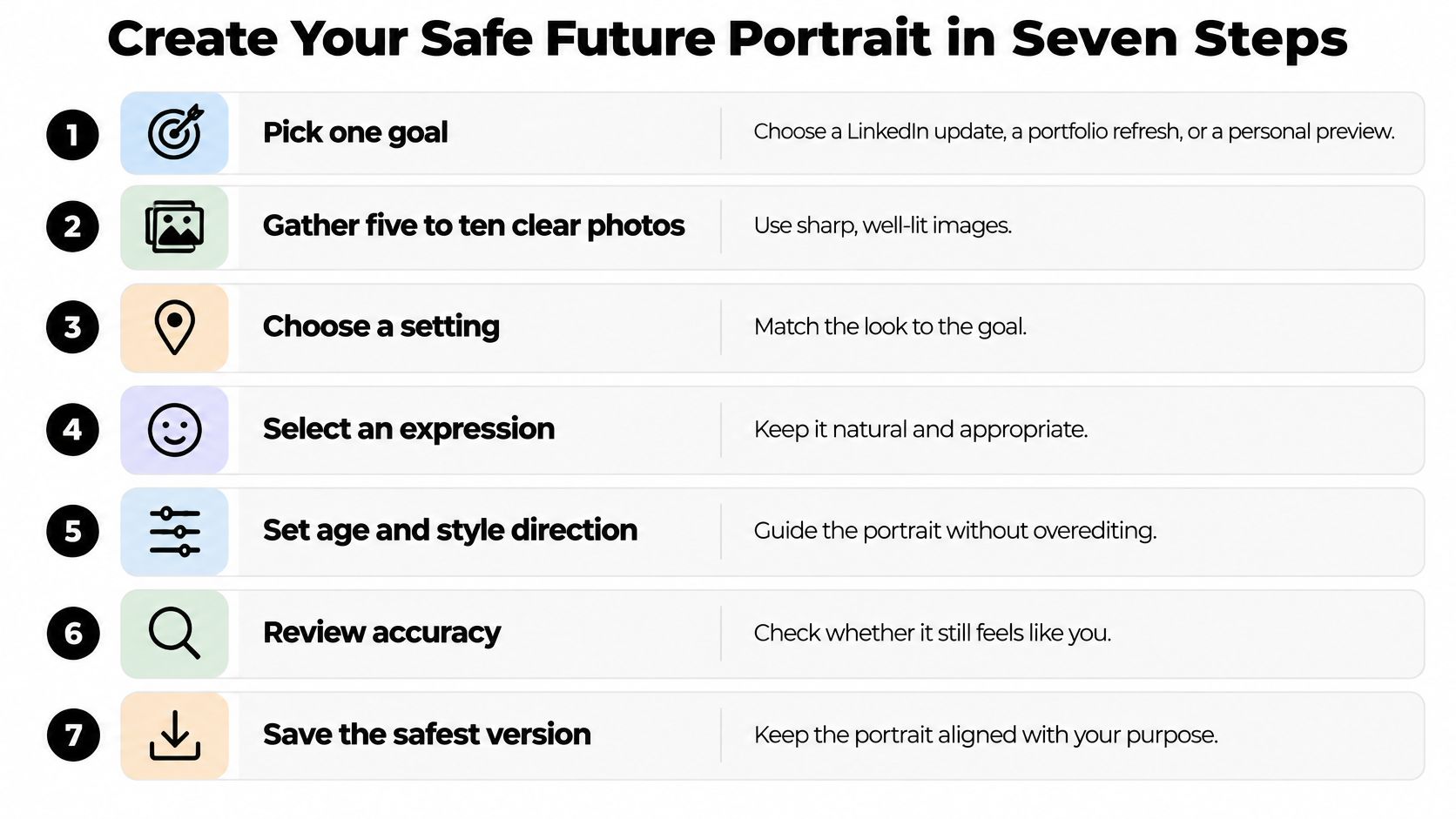
Prepare the inputs and boundaries
- Pick one goal. Choose a LinkedIn update, a portfolio refresh, or a private future-self exploration. Write a short acceptance statement, such as a recognizable client-facing portrait with a relaxed expression and a clean office setting. This keeps unrelated styles out of your selection process.
- Gather five to ten clear, recent images as an initial reference shortlist. Include varied angles, natural light, and an accurate view of your hair and face. This is a preparation recommendation, not Secta's upload requirement. For our workflow, prepare the full set of personal images requested during upload rather than treating the shortlist as sufficient.
- Read privacy and retention terms before uploading. Record the ownership, storage, deletion, and training provisions that matter to you. For a company project, decide who administers the gallery and who can authorize publication. Resolve these questions before employees contribute personal images.
Generate with a clear stopping point
- Create a small working batch and change one variable per round. Start with the expression or background rather than requesting a complete transformation. For example, compare a relaxed mouth with a natural smile while keeping clothing and setting unchanged. You'll be able to identify which choice improves the portrait without confusing it with unrelated changes.
- Compare each candidate with the original at full size. Run the structural checks before considering style, then inspect the intended profile crop. Ask someone who knows you to identify anything unfamiliar without first telling them what you changed. A vague reaction that it doesn't look quite right is a reason to investigate, not an objection to dismiss.
- Limit revisions to one or two edits before reviewing again. Save an approved base version and return to it when a later change fails. Don't keep repairing an output whose face has already drifted. This makes approval easier and avoids spending time on a chain of increasingly uncertain revisions.
- Add disclosure, save the reference, and publish the approved version. Keep the original, the selected output, and the approved usage together. For teams, give each person a final opportunity to approve their likeness. Publication should follow that approval, not happen automatically because a batch finished generating.
Finish at the resolution you need
At Secta, our custom upscaler increases generated images to high resolution without damaging facial resemblance or overly smoothing the face. Use that finishing step on a selected portrait, then inspect the final export rather than assuming the earlier preview is the only version that needs approval.
Success is straightforward: you recognize yourself immediately, the requested presentation is intact, and the disclosure is in place. A large gallery is useful only when you can confidently select something from it.
Pick your goal, prepare your reference images, and create your first focused batch with Secta Labs. Our AI headshot and portrait workflow lets you edit outfits, hair, glasses, and localized backgrounds on any image, while teams can use a shared process for consistent staff portraits. Start with a restrained direction, approve your likeness, and publish a clearly labeled portrait you can stand behind.