Headshots for Therapists That Build Trust in 2026
“Smile naturally and look professional” is incomplete advice for headshots for therapists. An AI portrait can satisfy both instructions and still feel wrong for your practice, misrepresent your appearance, or expose information you shouldn't have uploaded.
Choose a recognizable portrait that suits the place clients will encounter it. Generative AI makes testing expressions, clothing, backgrounds, and crops easier, but faster production only helps when you know what to approve. Your standard should be simple: credible, approachable, and unmistakably you.
Headshot Styles by Therapy Setting at a Glance
Build a small, coordinated set rather than using one image everywhere. Start with one master portrait for your most important client-facing channel, then generate expression variants and crops where the setting calls for something different.
A directory thumbnail needs immediate facial clarity. A speaking biography can accommodate more posture and environment. You don't need a different professional identity for each placement, just a deliberate adjustment in presentation.
Verändern Sie Ihr professionelles Image
Erhalten Sie atemberaubende KI-generierte professionelle Fotos in weniger als einer Stunde. Laden Sie normale Selfies oder Gruppenfotos hoch, wählen Sie aus über 100 Stilen und wir erstellen Hunderte von perfekten Aufnahmen, die Sie von Ihrer besten Seite zeigen.
Headshot style by therapy setting
Individual counseling calls for interpersonal warmth because clients are considering a personal conversation. Clinical and psychiatry profiles benefit from a composed presentation that doesn't feel remote.
Telehealth portraits should resemble the person clients will meet onscreen. LinkedIn needs a recognizable professional introduction, while institutional directories prioritize consistency and legibility. Speaking pages allow a wider generated portrait because readers also need to picture you addressing an audience.
For a useful comparison of real practice-profile contexts, browse the therapist profiles from Embodied Living Counseling. Use the exercise to assess placement and tone, not to infer how anyone's image was produced. For a more clinical presentation, our guide to headshots for doctors and medical professionals offers related styling considerations.
Optimize selection without chasing glamour
A 2025 peer-reviewed study of 108 Spanish-speaking participants reviewing mock therapist profiles found that therapists with more attractive facial features were selected more often, even after accounting for perceived trustworthiness and competence; unattractive images performed no better than profiles without an image. The study measured hypothetical selection, not actual appointments or therapeutic effectiveness.
That's not a reason to generate a more glamorous face. It's a reason to select your output carefully rather than assuming any portrait improves a profile.
Say a counselor generates a warm, lightly smiling website portrait and a composed, neutral insurance-directory variant. Keeping the core appearance consistent makes that adaptation quicker than rebuilding each image separately.
Before approving any variant, ask:
- Visibility: Is my face clearly visible?
- Fit: Does my expression suit this setting?
- Background: Does the environment stay quiet?
How Your Headshot Shapes First Impressions
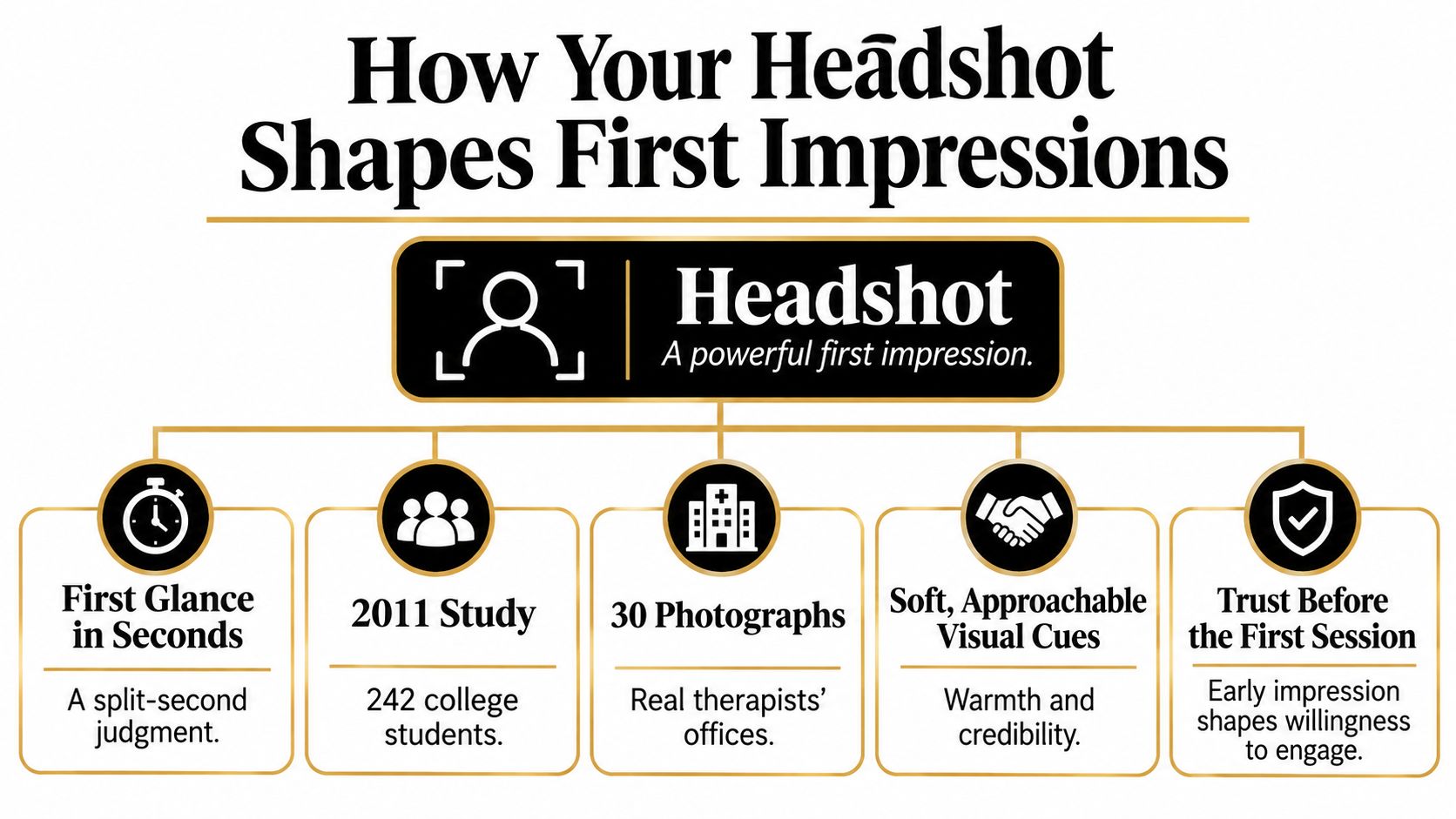
Prospective clients can begin judging your presentation before they read your approach to therapy. An AI-generated portrait belongs to that first encounter, so evaluate it as a professional introduction rather than a decorative website asset.
A 2011 study involving 242 college students and 30 photographs of real psychotherapists' offices found that soft, personalized, orderly spaces prompted expectations of better care and greater comfort, alongside more favorable ratings of therapists' qualifications, friendliness, organization, and professionalism. The researchers studied offices, not headshots. The useful principle is narrower: people infer professional qualities from limited visual information.
For generative portraits, that means an invented background isn't a neutral styling choice. A softly rendered consultation-like space communicates something different from a dramatic executive office, even when the face stays unchanged.
What viewers may infer
A 2022 study of 129 young adults evaluating images of female therapists found that higher perceived attractiveness could transfer to other positive therapist attributes and, through those perceptions, greater inclination toward self-disclosure; the makeup manipulation affected that pathway, but not in a uniformly positive or simple way. This doesn't establish a beauty standard or demonstrate improved treatment outcomes.
Think of your generated portrait as the front window of a practice. It sets expectations before anyone opens the door, but it can't demonstrate the quality of care inside.
Assess the combined message:
- Warmth: Do the eyes and mouth look relaxed rather than mechanically cheerful?
- Competence: Do grooming, clothing, and setting look intentional?
- Emotional safety: Does the expression feel available without becoming overly familiar?
- Consistency: Does the image match the care described beside it?
Avoid a promise-image mismatch
Suppose a therapist advertises gentle, trauma-informed care but chooses an AI portrait with a stern expression, severe crop, and imposing office backdrop. The individual details might look polished, yet the overall introduction conflicts with the practice's language.
For context on that care approach, Understanding trauma-informed therapy benefits from Be Your Best Self & Thrive Counseling, PLLC can help you consider what clients are seeking before choosing an expression.
Use AI editing to resolve the mismatch efficiently: soften the expression, simplify the setting, or widen the crop. These are presentation decisions, not substitutes for clinical competence, and the evidence doesn't prove that a headshot creates trust or improves outcomes by itself.
Composition, Lighting and Background That Read as Warm
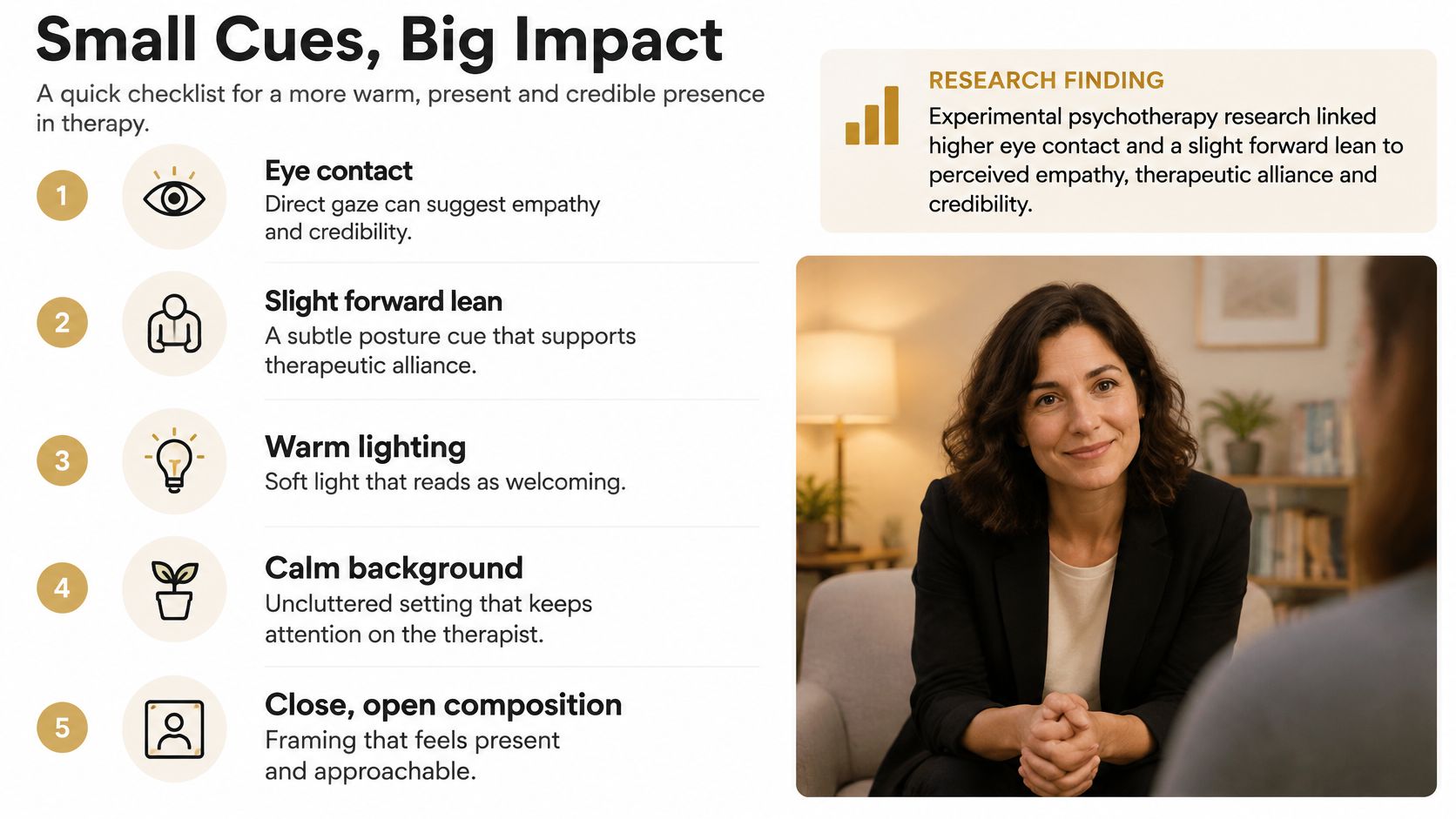
In experimental psychotherapy research on nonverbal behavior, higher eye contact and a forward trunk lean increased observers' perceptions of empathy, therapeutic alliance, and treatment credibility. The study used filmed sessions, not generated portraits, so treat those findings as direction for visual choices, not proof that a still image creates an alliance.
For AI outputs, translate the principle into a restrained composition. Ask for presence and openness, not exaggerated friendliness.
A practical generation and review routine
- Face the viewer with open shoulders. Request a face oriented toward the camera, relaxed shoulders, and a slight forward orientation. Reject outputs with a hunched torso or exaggerated lean, which can make the pose look forced.
- Inspect the eyes before anything else. Keep both eyes sharp and visible. If glasses contain glare, regenerate or adjust the result, then check that the correction hasn't changed the frames, eye shape, or facial identity.
- Request soft frontal or angled light. Soft frontal light or a roughly 45-degree lighting direction is a useful portrait instruction. Avoid harsh simulated overhead light that hollows the eyes, along with excessive smoothing that removes natural facial detail.
- Separate the person from a simple background. A muted wall or softly blurred office-like environment is enough. Reject distracting shelves, invented signage, and bright objects near the head rather than trying to make a complicated scene work.
- Generate room for different crops. Keep a spacious source portrait for website layouts and create tighter exports for profile thumbnails. Avoid awkward cuts at elbows or shoulders, and don't assume a close headshot will stretch successfully into a wide website hero or LinkedIn banner.
This routine makes revisions more targeted. Instead of regenerating every detail, change the specific feature that failed review while checking that the rest remains consistent.
Keep engagement within professional boundaries
Avoid crossed arms, a downward gaze, and an extreme facial crop as default choices. They can work against the open presentation you're trying to create. An intense stare or pronounced forward lean can also feel intrusive, especially in trauma, pediatric, or crisis-focused contexts.
Say a child-focused therapist generates a slightly wider, chest-up portrait with relaxed shoulders and visible space around the body. That gives the image a less imposing presentation than a tightly cropped face, without adding toys or a fabricated treatment room.
Don't judge only the full-resolution output. Review the exported crop on a phone, where subtle expression details may disappear and background distractions become harder to distinguish.
Wardrobe and Styling Choices for Clinical Trust
Start with solid, muted colors such as navy, slate, sage, and warm grey. In a generated portrait, clothing should look like you on a good day in your own practice, not a costume selected from a stock catalogue.
Bright logos, tight stripes, and busy prints compete with the face on small screens. Pure white can also create an unhelpful result when the generated lighting washes out fair skin or reduces separation between clothing and background. Judge the combination, not the color in isolation.
Choose plausible clinical clothing
Soft collars and open necklines are useful starting points. Keep jewelry simple, omit distracting watches and lanyards, and inspect generated accessories for malformed clasps, inconsistent earrings, or other details you wouldn't wear.
Don't add hospital badges, uniforms, or institutional logos to manufacture authority. A generated outfit or setting shouldn't imply employment, credentials, or an affiliation you don't hold. Removing these details before approval is easier than explaining an inaccurate impression later.
Keep hair, religious dress, makeup, and usual accessories consistent with how clients will meet you. Don't accept a default styling choice that erases something important about your everyday presentation.
Test clothing without changing everything else
Run a three-outfit comparison using the same face, pose, background, and lighting direction. For example, compare a blazer, a knit top, and a cardigan while holding the other variables steady. That makes the decision easier because you're evaluating wardrobe rather than several unrelated images.
Choose the version where you look most like yourself in practice. Keep one outfit for the master portrait and one alternate for contexts that need a different level of formality. AI clothing adjustments save time here, provided each output still passes a realism check.
Protecting Privacy Before You Publish
A neutral background does not make the photo you uploaded private. “Don't show clients” is not a complete privacy rule for AI headshots. Your reference images can expose readable screens, calendars, artwork, whiteboards, house numbers, children, cars, and window views before you generate a finished portrait.
The Tranqbay therapist-headshot guide recommends removing geolocation data and doing a room-by-room privacy review. Apply that review to inputs as well as outputs. Replacing a background later does not undo information you already uploaded.
Privacy exposures and fixes before publishing
Separate confidentiality from personal security
Client confidentiality covers information about people receiving care. Your own security covers your home, routine, family, and neighborhood. A professional-looking image can fail either test.
A home-office reference can look clean at first glance and still leak. A weekly calendar reflected in the glass of a framed print makes a therapist's schedule readable. A generated plain-wall background can remove the calendar from the portrait, but the original upload still carried it.
Use this pre-upload routine:
- Review the room from the camera's position. Inspect reflections as well as the obvious background.
- Remove location metadata. Our explanation of what photo metadata contains helps identify information outside the visible image.
- Choose a neutral reference environment. Stay away from windows, entrances, and recognizable views.
- Exclude all client materials. Do not rely on generation or background replacement to conceal notes and appointment details.
- Read the handling terms. Check upload retention, cloud storage, deletion rights, ownership, and how generated likenesses are used.
Before you rely on a vendor's promise, compare legal and technical confidentiality controls. Contract language and practical safeguards answer different questions, so check both. Secta's terms also restrict use: users may not use generated headshots for sale or for the benefit of any third party. Ownership and permitted use are separate questions.
A room and file review takes minutes. Do it before you upload, not after information has already been shared or published.
Using AI Headshots Accurately and Openly
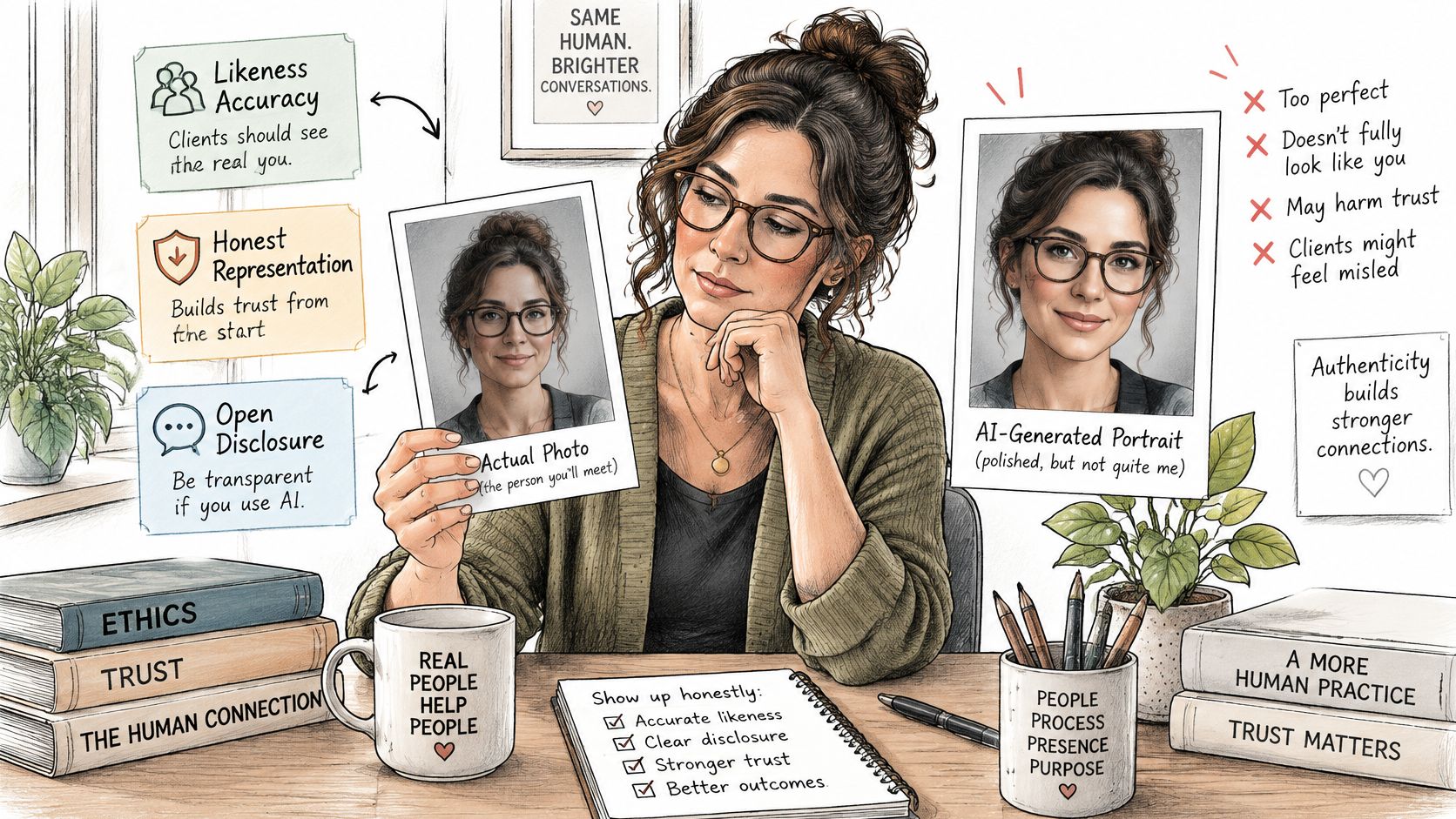
The most polished headshot can damage trust if it no longer looks like the therapist a client will meet. Better lighting is an improvement. A different face is a misrepresentation.
Set a current-likeness standard before choosing your favorite output. Preserve age, facial structure, body proportions, hair texture, and disability-related or accessibility-related presentation. Don't let aesthetic preference override recognizability.
Run a side-by-side likeness check
Place a recent, unaltered image beside each generated candidate. Reject outputs that erase age lines, reshape the jaw, change proportions, or substitute a hairstyle you don't have. Keep the portrait a client would recognize in the room.
Use only authorized images of yourself as references, never client or family-member images. The NIST Generative AI risk profile identifies unconsented use of facial likeness and disclosure of personally identifiable information as privacy risks, making upload and likeness-handling terms important before submission.
The FTC's AI consumer-protection guidance makes clear that AI doesn't exempt companies from ordinary consumer-protection requirements and discusses prohibitions on deceptive impersonation of businesses, governments, and their officials or agents. For therapist portraits, avoid invented affiliations, institutional branding, and identity cues that communicate something untrue.
Be open about material AI assistance
Research on generated professional-looking portraits found that viewers' judgments of authenticity, social appeal, and trust can depend partly on perceived provenance and disclosure. Visual realism isn't the only consideration.
Suppose a therapist generates twelve options and rejects four because they smooth away her wrinkles. She selects a recognizable result and adds a short website note explaining that the portrait is AI-assisted. Those counts describe a hypothetical review, not a performance claim.
Our guide to AI image detection provides context for evaluating synthetic imagery, but your approval decision shouldn't depend on whether someone can detect AI use. It should depend on whether the image represents you.
Follow disclosure requirements set by a directory, employer, or professional body. Disclosure is also advisable when AI assistance is material or noticeable, but if the difference changes your identity, reject the image rather than explaining it away.
Build Your Therapist Headshot Set This Week
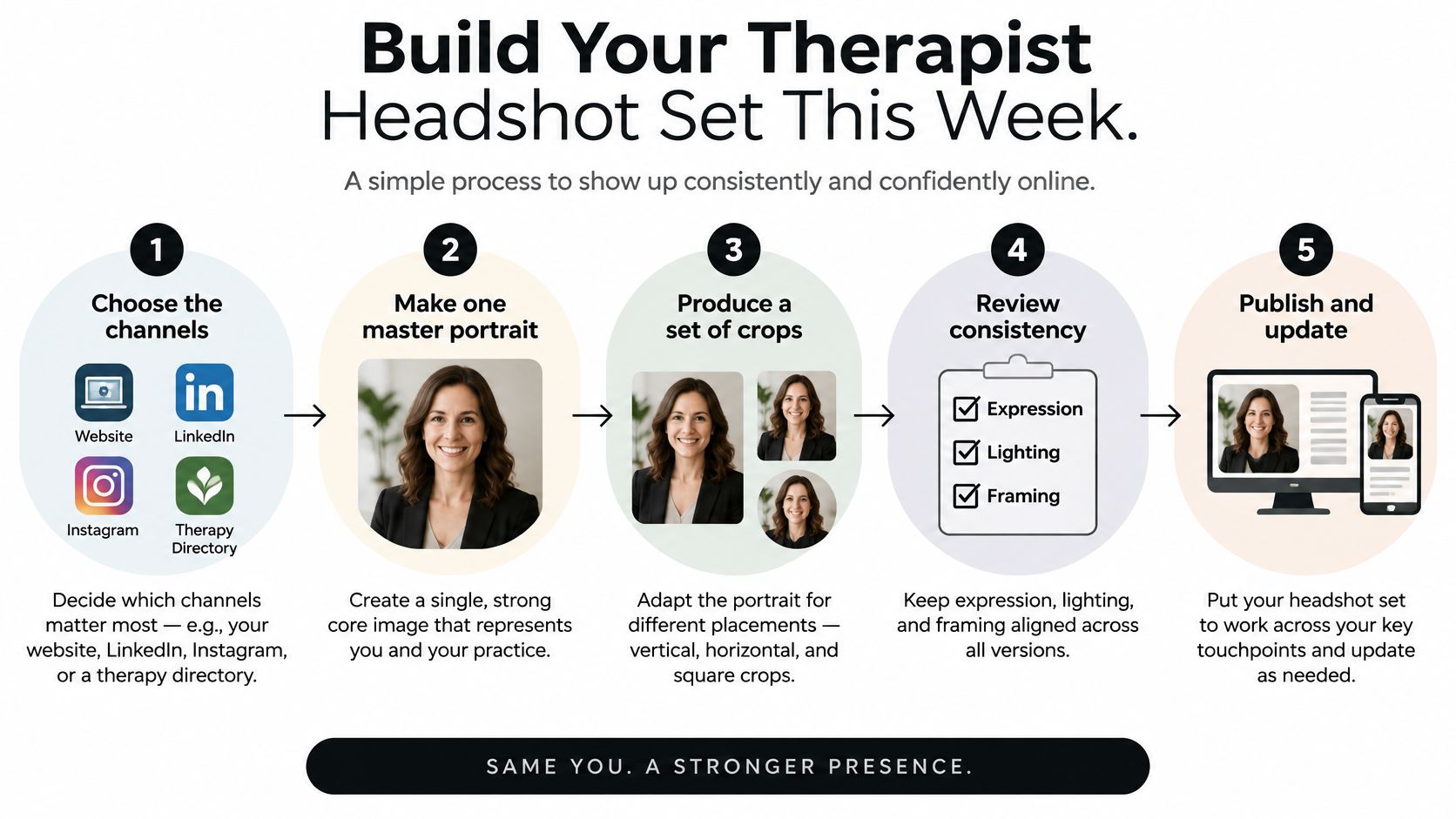
Stop collecting random styles. Pick four placements that book clients, then build one recognizable master portrait plus exact crops for each.
A focused production workflow
- List your priority placements. Start with your practice website, directory profile, LinkedIn profile, and telehealth account. Note each platform crop and upload requirement.
- Prepare your references. Our creation process uses 10 to 20 photos, followed by gender selection. Use recent, clear images of yourself alone. Older photos create mismatches clients notice on video.
- Generate for the actual setting. Specify expression, wardrobe, framing, and background for each placement. A directory photo and a LinkedIn banner need different framing.
- Review before selecting. Reject altered features, privacy exposures, invented affiliations, and implausible details. One wrong background detail costs more trust than a plain photo earns.
- Export a coordinated set. Choose the master portrait, keep clothing consistent where it helps recognition, and prepare each required crop.
- Publish and record the date. Refresh the set when your appearance changes. An outdated professional identity confuses returning clients.
Compare the workflow, not just the price
The 2025 average U.S. professional headshot session at 216 to $427 from Thumbtack pricing figures summarized by Hermosso sets a useful benchmark for budgeting a studio visit.
Studio session compared with an AI headshot set
AI generation lets you test clothing and backgrounds in one sitting without booking another appointment.
Allow time for review. Generating quickly does not mean every output is publishable, and your approval decision is what protects trust. At Secta Labs, you can upload references, generate options, and adjust clothing, expression, or background while checking each result against your approval criteria.
Choose your channels today and build your therapist headshot set this week. Start with our Professional Headshots or LinkedIn Headshots categories. Our wider categories include Actor Headshots, Corporate Headshots, Secta Mirror, Fun Profile Pictures, Oil Painting Generator, and Gift Headshots, but keep this task focused. Select a recognizable master portrait, make the necessary variants, and publish only the images that accurately introduce you.