AI Improve Picture Quality: A Practical Guide for 2026
You needed a LinkedIn headshot tonight, and the only file you have is a dim selfie from a spare room. The lamp sits behind you, one shoulder is cut off, and no photographer can get there before the profile goes live.
A sharper file is not the win. The portrait has to still look like you. Generative AI headshots can get a usable image into your hands the same evening, but only if every pass protects the face you already have. Speed is worth it when the likeness stays true. If the jaw, hairline, or skin stops being yours, throw that version out.
Four Ways AI Improves Picture Quality
That spare-room still fails for four different reasons, so one slider will not fix it. Upscaling, denoising, enhancement, and generative fill each attack a different defect. Used in that spirit, AI can improve picture quality the way a careful retoucher rebuilds likely detail, instead of stretching pixels until the face turns plastic.
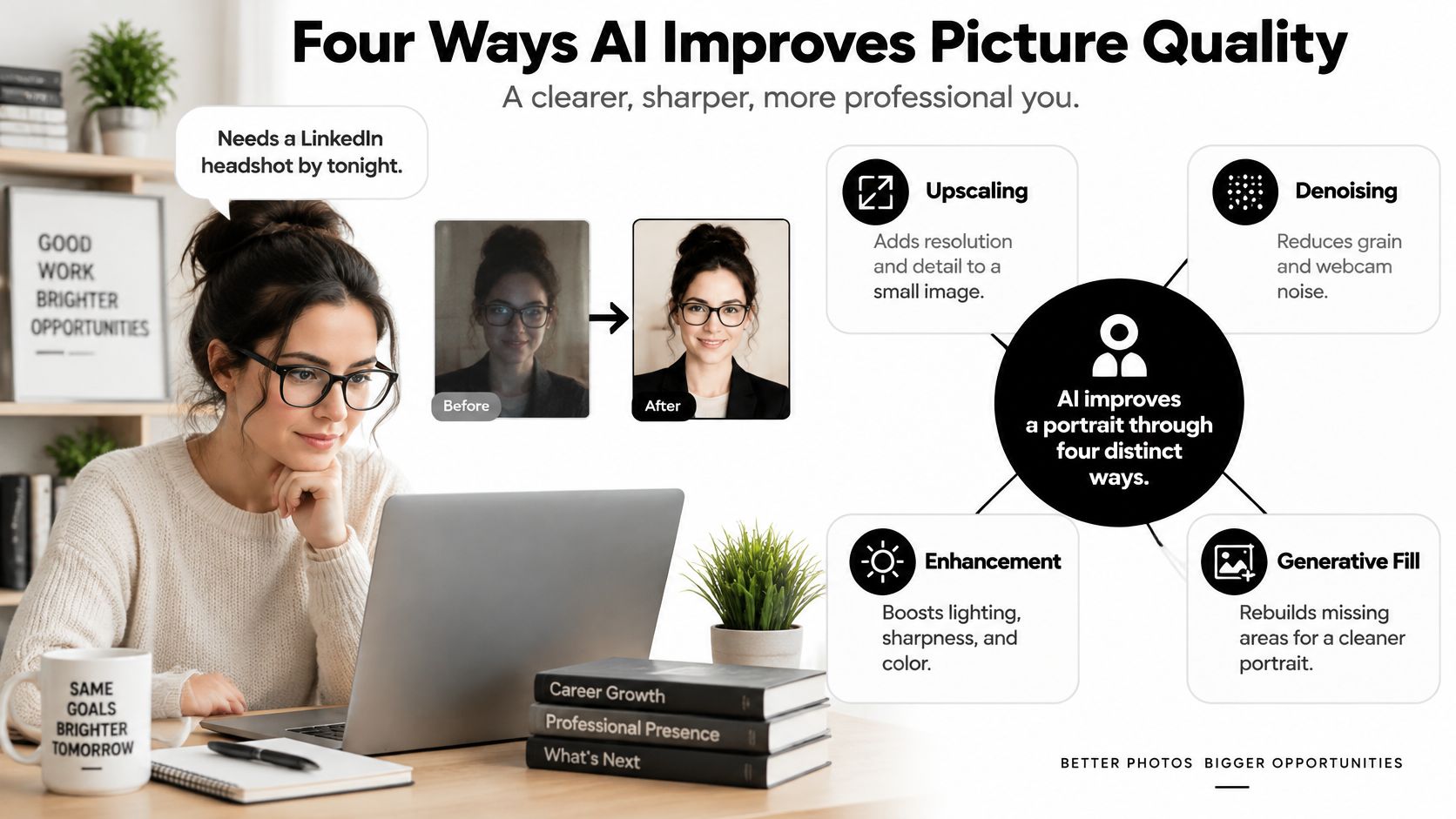
Upscaling gives a small face enough resolution to hold on a banner or a print. Denoising lifts webcam grain before anything else touches the skin. Enhancement corrects flat light and dull colour so the portrait can sit on a brand page. Generative fill adds shoulder and background room for a crop. It must never redraw the face.
A 2025 Adobe and Harris Poll survey of more than 16,000 creators across eight countries found that 55% use generative AI for editing, upscaling, and enhancement, making quality improvement the most common reported use. Agents who also publish listings should keep property images on a separate track, and real estate photography advice from Edinhart is the right place for that work. Do not ask a headshot model to invent a kitchen.
Denoise and upscale a clean selfie first. Add lighting and framing only after the face is sharp and still yours. That order gets a publishable portrait faster than restyling a broken source.
Transforme a sua imagem profissional
Obtenha instantâneos profissionais impressionantes gerados por IA em menos de uma hora. Carregue selfies normais ou fotografias de grupo, escolha entre mais de 100 estilos e nós criaremos centenas de fotografias perfeitas que representam o seu melhor.
Privacy, Consent and Honest Portraits
Do not generate a portrait from a photo you do not have the right to use. NIST identifies a concrete risk here: image-generation models may expose personally identifiable information, including a person's facial likeness, when images are used without consent. Consent is what lets a professional say yes to AI portraits without gambling on someone else's face.
Say an employee uploads reference photos so a company can build one corporate set. Before anything is generated, the employee and the company both confirm consent, ownership, and permitted use. A short written yes beats a folder of casual selfies nobody agreed to process. Our customers upload once, we keep that data private and secured while the photos are edited, and we use the kept model and those uploads only to improve product quality. NIST also recommends privacy-enhancing techniques and synthetic data practices that avoid disclosing personal information. No single retention period or security standard applies to every provider, so read the terms for handling, storage, and deletion before you upload.
What else has to stay honest
Provenance is the second half of trust. Keep the original reference photos and a generation record, and disclose or label synthetic imagery when a platform, employer, client, or local rule requires it. NIST's synthetic-content guidance does not set one universal labelling law or one watermark format. Follow the rule that governs that use.
Representation fails if you batch-approve. NIST reports that image-generation models can produce biased or stereotyped outputs and may fail to represent racial features or age accurately. Review each person on their own. A polished set that homogenises hair, age, or complexion is not a time saver. It is a likeness you will have to redo.
Transparent controls are also faster than a conventional shoot that scatters copies of personal images across photographers and studios. Companies get a repeatable path for new hires and remote teams. Before a directory goes live, a search by image shows whether the new portrait still matches photos that person already uses in public.
Copy this checklist:
- Consent: Get a yes from the person in the photos, and file a model release when the portrait will be published for a company.
- Ownership: Upload only images you own or are authorised to use.
- Retention: Confirm how uploads are handled, kept, and deleted.
- Labelling: Disclose synthetic imagery wherever that platform or jurisdiction requires it.
- Approved version: Save the original, the generation record, and the one portrait someone signed off.
How to Improve a Headshot with AI Step by Step
Each pass should protect the next one. A marketing manager with a single 1080p selfie needs a corporate headshot and a website banner by morning. One upload can do that. Customers upload their photos once and receive hundreds of studio-grade portraits in under an hour, then the human check decides what ships.
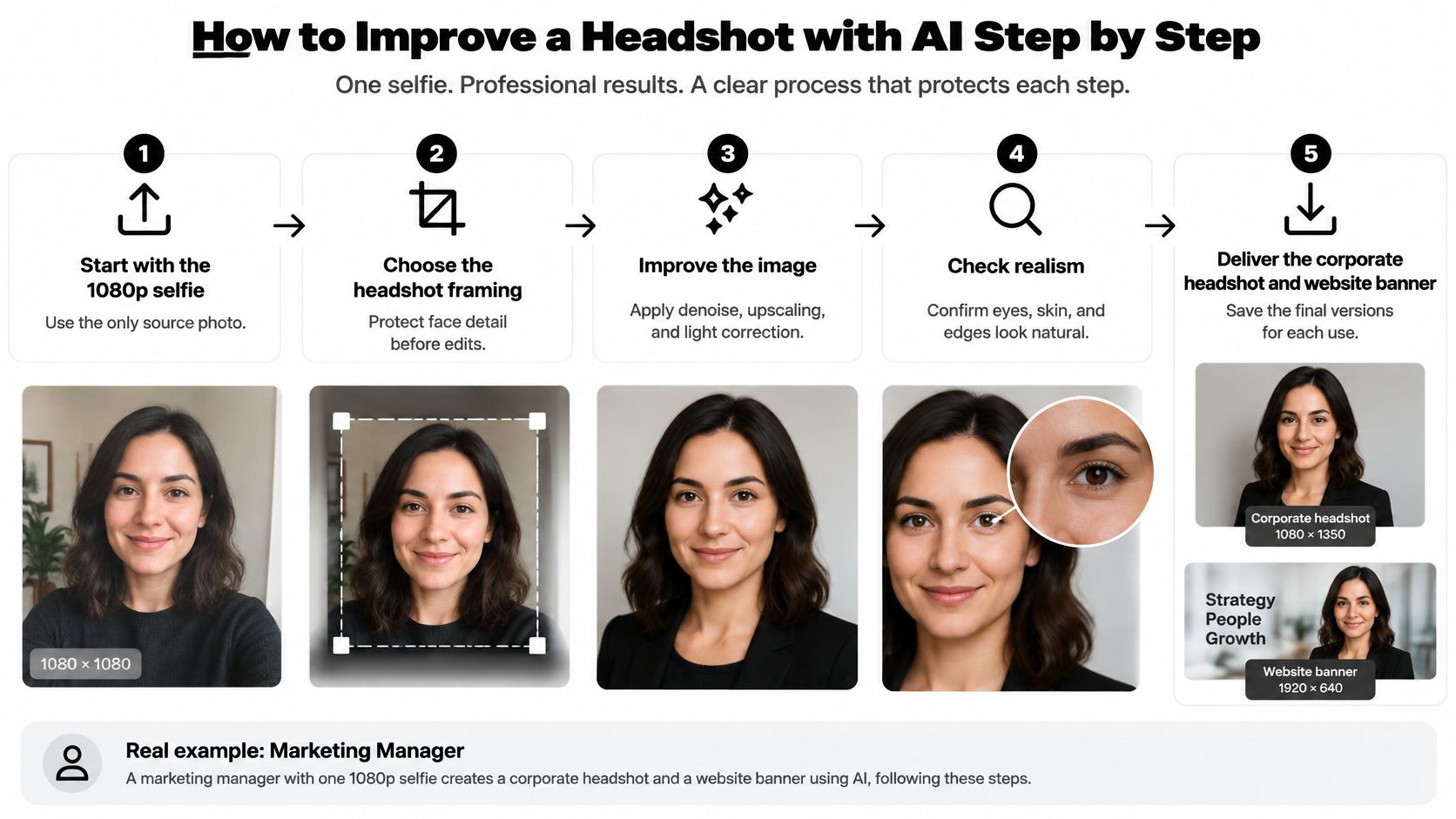
- Choose the source. Confirm you own it, then pick the sharpest, most evenly lit face. The model can only reconstruct what is already there. A tight crop that chops the chin upscales poorly, so leave a little room around the head.
- Denoise at low strength. Clean grain on the background and open skin, and leave hair and eyebrows alone. Heavy denoising erases strands you cannot realistically paint back.
- Upscale the face. Raise resolution for the banner, then check that the person is unchanged. Over-smoothing is the usual cause of waxy skin, so stop while pores and smile lines are still visible.
- Set light and colour. Match a natural or seasonal look, and keep one skin tone across the set. A warmer grade that shifts only this frame will clash with the rest of the team page.
- Generate variations and pick the closest likeness. More drama is not more professional. If two options are close, choose the one a colleague would recognise in a hallway.
- Extend framing last. Add shoulders or background only. Never regenerate the face to fix a crop.
Compare every keeper with the original at full size. Run identity, skin, edges, and lighting as yes-or-no checks, and publish only if the person would recognise themselves. That review takes minutes and saves a reshoot.
Artifacts to Watch for and How to Fix Them
The artifact that matters most is a face that no longer matches the person. Reject waxy, plastic skin first. It arrives when upscaling smooths the face past the point where pores, smile lines, and tiny asymmetries survive.
Pixel scores miss it. A real-world denoising benchmark reports a compact 20.96 MB RIDNet denoiser at 36.6 dB PSNR and 0.142 LPIPS, while the transformer-based Restormer scored better on perceptual quality. Those metrics can disagree once a model removes noise and invents fine detail. Separate a light denoise from any face-aware pass. Treat smoothing on the eyes, eyebrows, hairline, or fabric as a reject.
A 2021 perceptual-quality study built the CIQA dataset with 6,667 reference images and 249,856 human ratings. As that study makes clear, strong pixel similarity can still look unnatural or overly smooth. Judge the portrait by identity, skin, light, and edges, not by a single sharpness number.
A two-size check
View the file at the size it will appear, then again at 100% zoom. Small defects hide when the image is reduced and show up in a download or a print. The jawline, teeth, and hairline are where a flattering edit turns into a different person. At thumbnail size those changes disappear. At print size they are obvious. If teeth, eyes, or jewellery drift, our guide to fixing resolution is the repair path: lower the strength and regenerate. Do not accept the pretty error.
When the approved file is headed for email, check signature image file size limits before you export. A clean likeness that will not load is not a finished deliverable.
Metrics That Show Real Quality Gains
A cleaner pixel score can hide a synthetic face. An upscaler can win the benchmark and still hand you skin that no colleague recognizes.
PSNR measures pixel agreement with a reference. SSIM scores local luminance, contrast, and structure. LPIPS is a learned perceptual distance, closer to what a viewer feels. A super-resolution benchmark discussion notes that higher PSNR and SSIM can fail to predict human preference and may even correlate negatively with later usefulness. On a face, the "best" number is often the waxy one.
Use all three, then add a person who knows the subject. Review identity, skin texture, hair edges, eyes, and clothing boundaries. Check the intended display size and again at 100% zoom, because a reduced preview hides defects that show in a download. Test across lighting, skin tones, camera quality, and pose. One average score hides the subgroup it fails.
Take a batch of 40 employee portraits. Do not approve the set because the mean looks fine. Split the review by skin tone, hair texture, and lighting. A small hallucination rate becomes dozens of unusable files once you generate at team scale. Run the quality checks for a finished portrait batch on the set, not on a single benchmark. The check that matters is whether the face still belongs to the person.
Copy this scorecard. Mark each line yes or no.
- Identity preserved: A colleague would name this person without help.
- Skin natural: Pores and small lines remain. Nothing looks plastic.
- Edges clean: Hair, eyes, and clothing boundaries are not melted or doubled.
- Lighting consistent: The face matches the rest of the set and the brand palette.
Approve only portraits that pass all four. Log the failures so the next batch starts from a tighter setting. That log is how a fast workflow stays honest.
Pick Your Workflow and Upload Your Photos
A consultant has one folder of selfies and three deadlines: a LinkedIn frame by morning, a relaxed portrait for a coaching site, and a campaign version for a client deck. Booking a studio three times is the slow path. The fast path only counts if every output still looks like that person.
Profiles with a clear, real photo tend to attract more views and messages than profiles with none. That is a reason to publish a real image. It is not a reason to ship a sharp face that no longer matches the subject. Likeness still decides whether you publish.
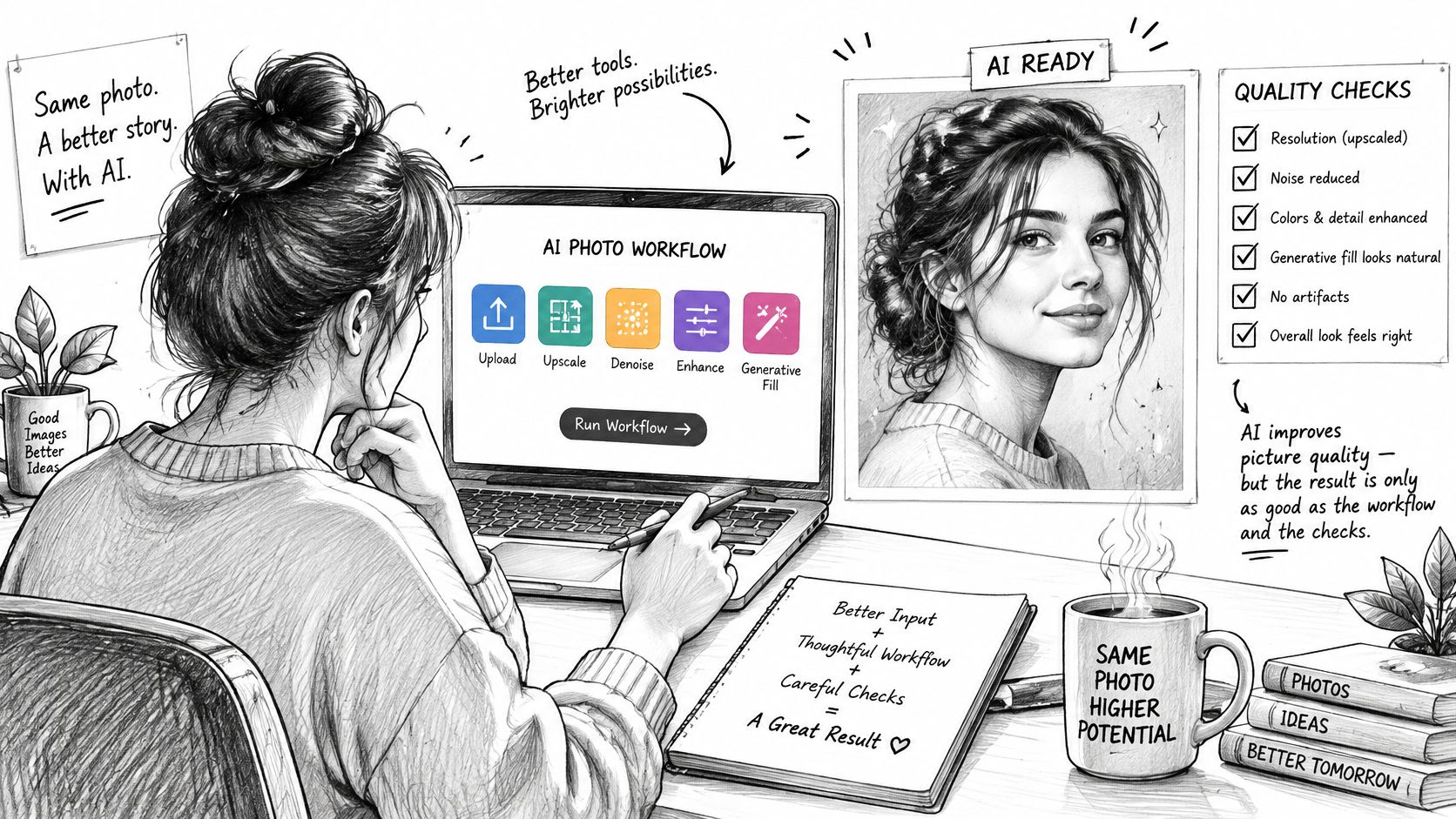
Secta's custom upscaler raises a generated image to high resolution without damaging facial resemblance or over-smoothing the face. Run it after the face is already right. Upscaling a drifted likeness only prints the error larger.
Variations builds a new set, and the count depends on how many changes you want. Small variations fix a stray error. Larger ones try a different pose, outfit, or background. Hold the same face across every option, and drop the dramatic frame if the person disappears. Generated pictures can be used for personal and commercial purposes.
Match the job before you generate. One formal set covers LinkedIn and a company bio, then stop. Team headshots go through the team dashboard, where an admin approves, edits, or regenerates so the set stays consistent. An actor's portfolio needs several variations, each checked against the same face, not against the most dramatic option.
Upload 15 clear personal photos you own, generate the set, and run the four-line scorecard. Approve the closest likeness. Reject anything you would not recognise in a hallway. If a face drifts, regenerate it before it reaches LinkedIn, a team page, or a client deck.